๐Ÿ‡ฆ๐Ÿ‡บ Melbourne, Victoria

Kenny
Khalid

IT Support Analyst Cloud Support Engineer
๐Ÿ™
github.com/kennykh
PowerShell scripting ยท IT support AI automation ยท CI/CD pipelines ยท Azure infrastructure
โ†—
โ˜๏ธ
Certified
MS-900 ยท AZ-900 ยท ITIL 5 ยท ACA-910
๐Ÿ“‹
In Progress
AZ-104 ยท SC-900
๐Ÿ›ก๏ธ
Work Rights
AU Permanent Resident
Qualifications

Certifications

Microsoft-certified with ongoing study toward Azure administration and ITIL service management.

โ˜๏ธ
MS-900: Microsoft 365 Fundamentals
โœ“ Certified
๐Ÿ”ท
AZ-900: Azure Fundamentals
โœ“ Certified
๐Ÿ“‹
ITIL 5 Foundation (AI Integrated)
โœ“ Certified
๐Ÿ”ง
AZ-104: Azure Administrator
โณ In Progress
๐Ÿงช
ACA-910: Atlassian Jira Service Management
โœ“ Certified
Technical Toolkit

Skills & Technologies

Broad hands-on experience across Microsoft cloud platforms, endpoint management, and IT support.

โ˜๏ธ
Microsoft 365
Exchange, Teams, SharePoint, OneDrive, Admin Center
๐Ÿ”ท
Microsoft Azure
Entra ID, VM management, IAM, Subscriptions
๐Ÿ–ฅ๏ธ
Active Directory
Users, groups, GPO, DNS, DHCP
๐Ÿ”’
Intune / MDM
Device enrolment, compliance, app deployment
๐ŸŽซ
ITSM / Ticketing
ServiceNow, Freshdesk, Jira, Zendesk
๐ŸŒ
Networking
TCP/IP, DNS, DHCP, VPN, firewall basics
๐Ÿ’ป
Windows & macOS
Desktop support, imaging, OS deployment
๐Ÿ“ง
Email / DNS
SPF, DKIM, DMARC, MX records, deliverability
๐Ÿ›ก๏ธ
Security & MFA
Conditional Access, MFA rollouts, endpoint hardening
๐Ÿ”ด
Microsoft Defender
Threat policies, Secure Score, anti-phishing & anti-spam
โšก
PowerShell
M365 admin automation, scripting, Exchange management
๐Ÿ™
GitHub / CI/CD
Version control, GitHub Actions, automated deployments
Infrastructure

How This Site is Built

This portfolio is a live Microsoft cloud project โ€” hosted and managed using the same tools I work with professionally every day.

๐Ÿ”ท
Azure Static Web Apps
Hosting & global CDN delivery
The site is deployed as an Azure Static Web App, providing global CDN distribution, automatic SSL/TLS certificates, and HTTPS enforcement โ€” all managed through the Azure Portal.
๐Ÿ™
GitHub
Source control & CI/CD pipeline
Source code is version-controlled on GitHub. Azure Static Web Apps integrates directly with the repository โ€” every push to the main branch triggers an automatic build and deployment via GitHub Actions.
๐Ÿ™ View GitHub Profile โ†—
โœ‰๏ธ
Microsoft 365
Custom domain email tenant
The contact@kennyk.online mailbox runs through a Microsoft 365 tenant. MX, SPF, DKIM, and DMARC records are configured on the domain for authenticated, secure email delivery.
๐ŸŒ
Custom Domain & DNS
kennyk.online
The custom domain is mapped to Azure Static Web Apps via a CNAME record. The same DNS zone serves both the web hosting and the Microsoft 365 mail service from a single domain.
๐Ÿ™
github.com/kennykh โ€” Open Source Lab Work
Explore my public repositories covering PowerShell scripting for M365 admin tasks, IT support AI automation, and CI/CD pipeline configurations โ€” the same skills powering this portfolio deployment.
๐Ÿ’ป PowerShell Scripting ๐Ÿค– IT Support AI Automation ๐Ÿ”„ CI/CD Pipelines โ˜๏ธ Azure Infrastructure
โ†—
See My Work

Portfolio

Hands-on implementations across Microsoft 365, Azure, and enterprise platforms โ€” documented with live tenant screenshots.

โ˜๏ธ
Microsoft 365
Exchange ยท Entra ID ยท Intune ยท Defender
๐Ÿ”ท
Microsoft Azure
Coming soon
Soon
๐Ÿ“Š
Dynamics 365
Coming soon
Soon
๐Ÿ”’

Microsoft Intune โ€” Device Management & Policy Deployment

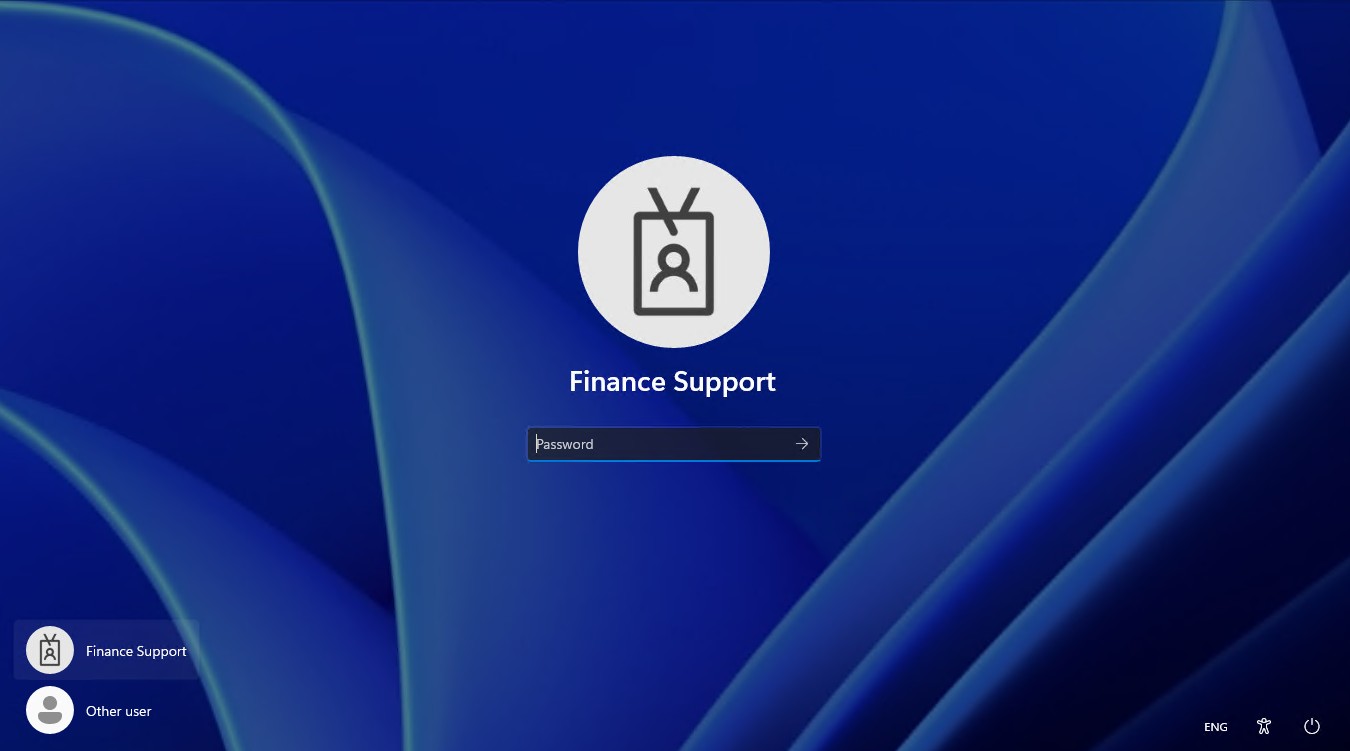
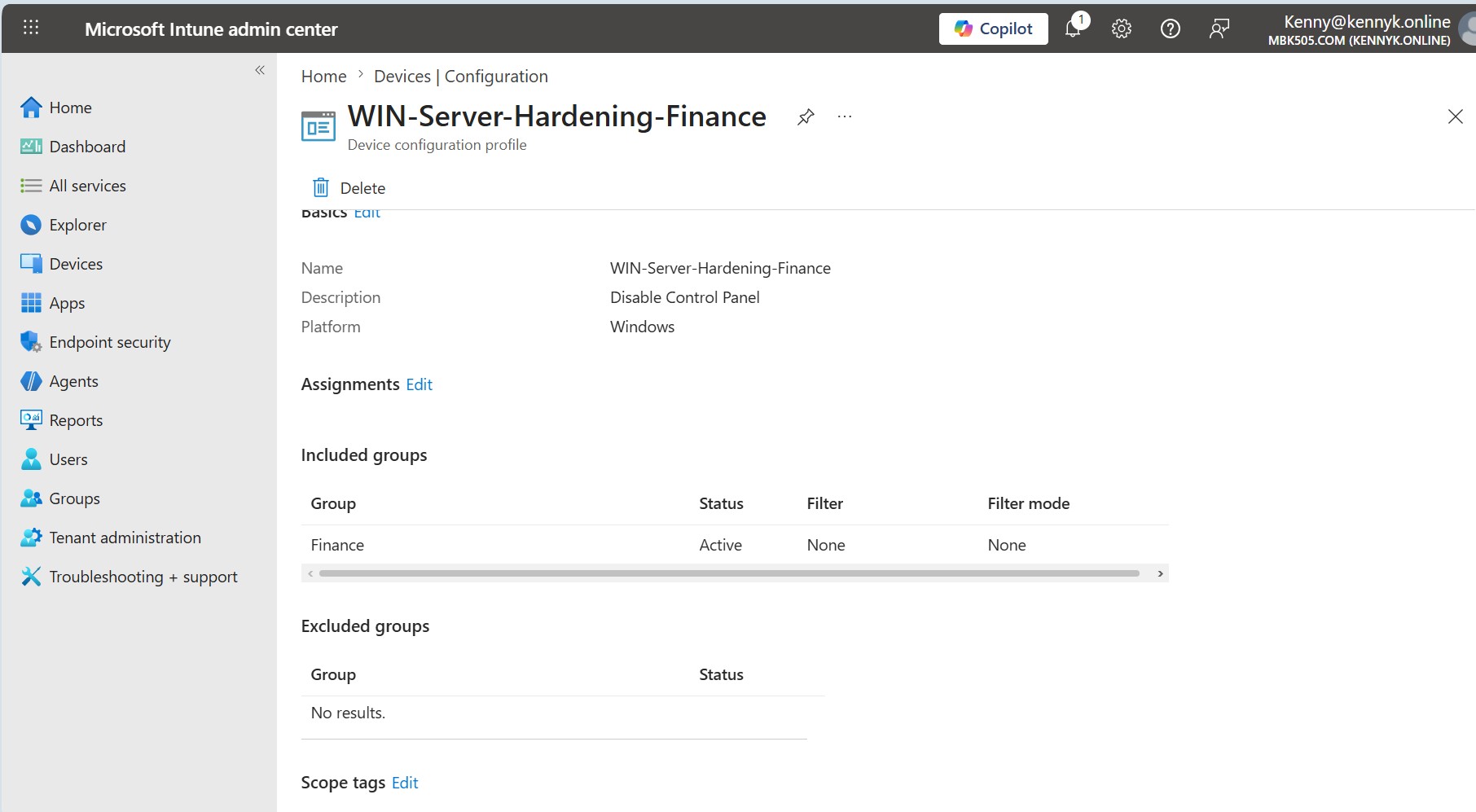
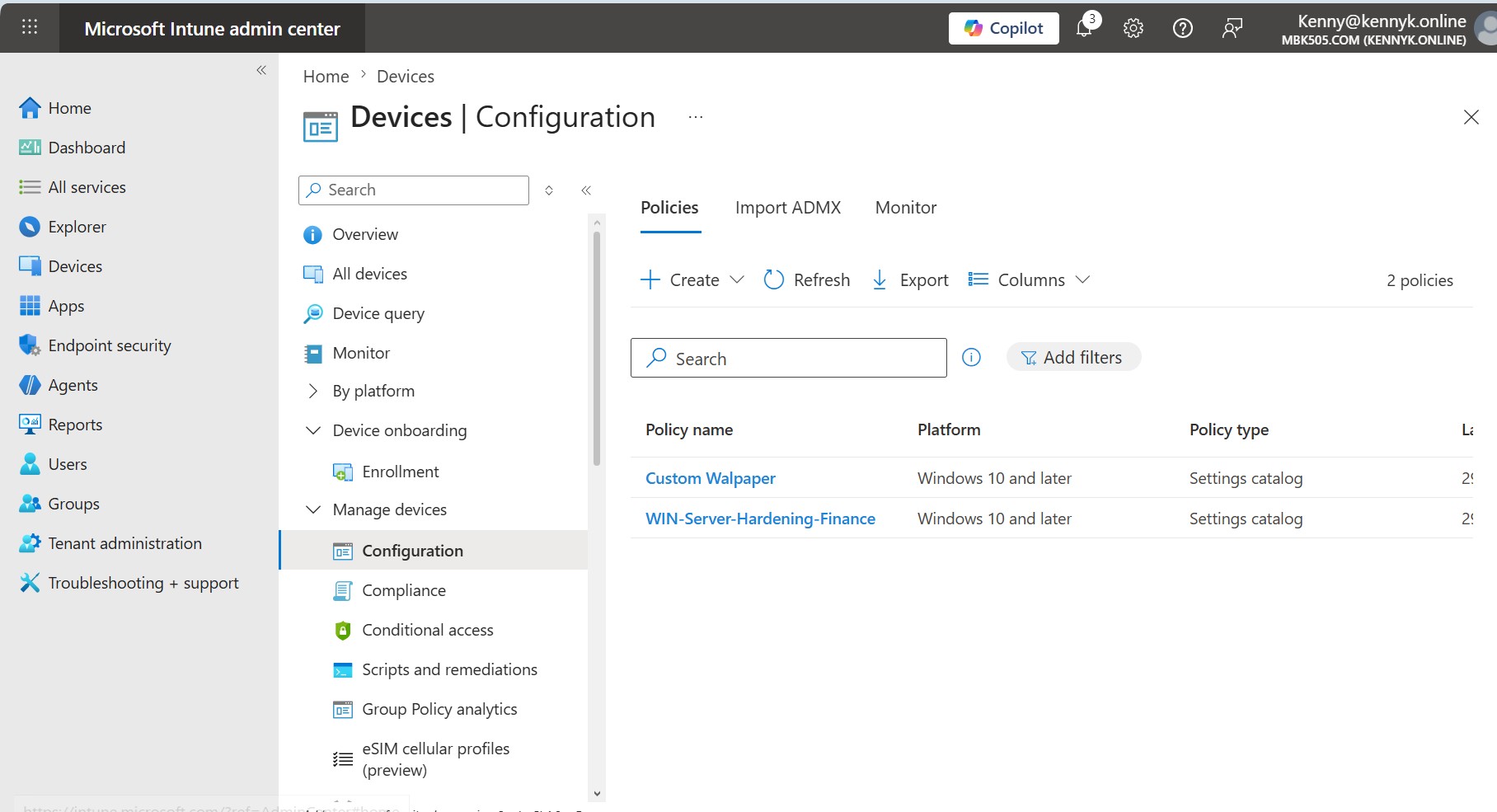
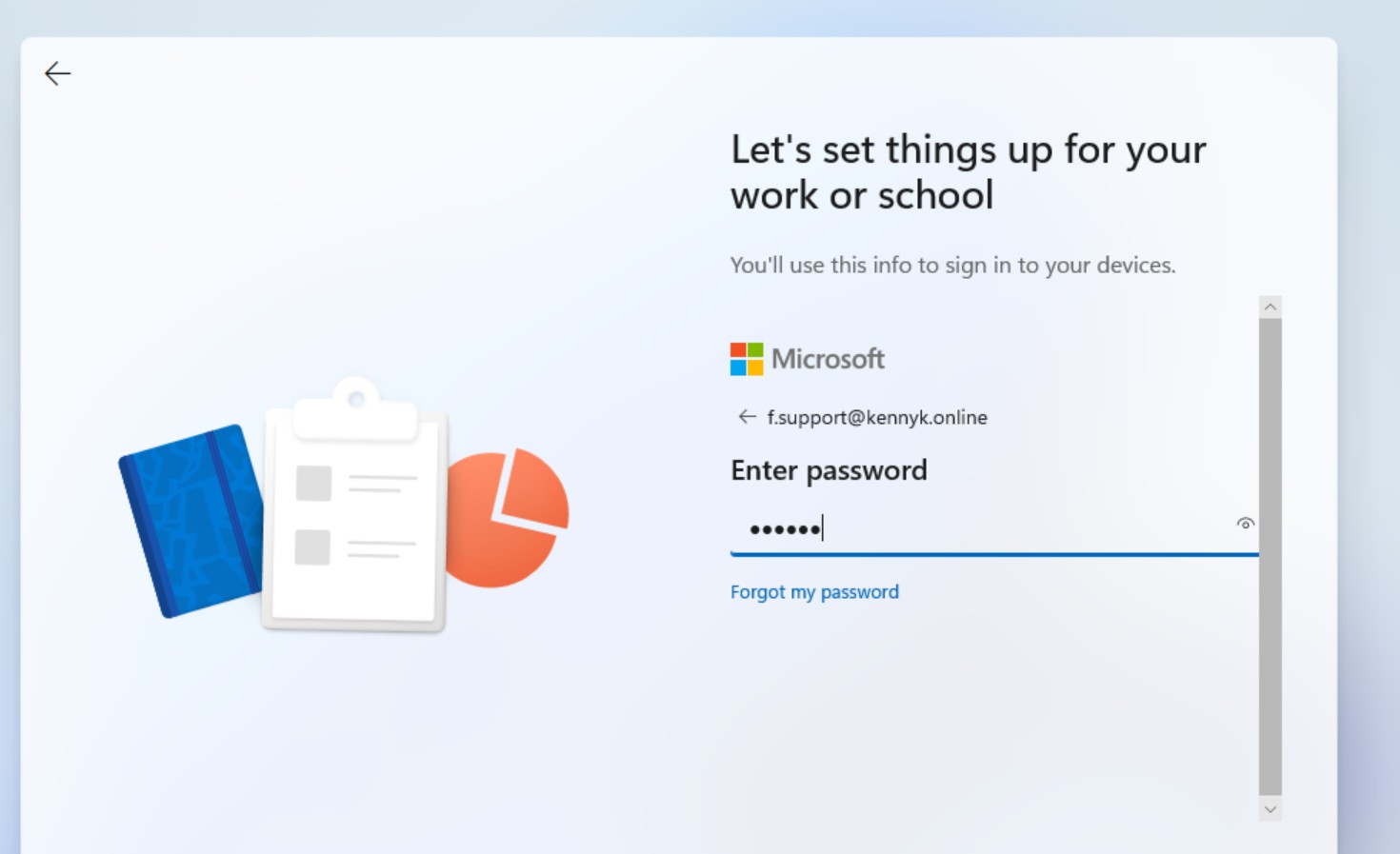
Configured a Microsoft Intune lab environment demonstrating end-to-end device enrolment and security policy enforcement. A dedicated Azure AD user (Finance Support) was created and added to the Finance group. The device was enrolled via Azure AD Join using that user's credentials, and a hardening policy (WIN-Server-Hardening-Finance) targeting the Finance group was applied to restrict access to the Windows Control Panel.
Intune Policies List
๐Ÿ” Click to expand
Intune ยท Devices ยท Configuration
Device Configuration Policies
The Microsoft Intune admin center showing two active configuration policies: Custom Wallpaper and WIN-Server-Hardening-Finance, both targeting Windows 10 and later devices via the Settings catalog policy type.
Azure AD Join Login
๐Ÿ” Click to expand
Intune ยท Enrolment ยท AAD Join
Azure AD Join โ€” Device Enrolment
The Windows OOBE "Set up for work or school" screen, showing the Finance Support user (f.support@kennyk.online) signing in with their Microsoft credentials to enrol the device into Azure AD and register it with Intune.
Windows 11 Login Screen
๐Ÿ” Click to expand
Intune ยท Post-Enrolment ยท Login
Windows 11 Login โ€” Finance Support User
The Windows 11 lock screen after successful Azure AD Join, displaying the Finance Support user account as the primary sign-in. The device is now Intune-managed and will receive all assigned configuration policies at next check-in.
WIN-Server-Hardening-Finance Policy Detail
๐Ÿ” Click to expand
Intune ยท Policy ยท Hardening
WIN-Server-Hardening-Finance โ€” Policy Detail
The configuration profile detail page for WIN-Server-Hardening-Finance โ€” a Windows device hardening policy with the description "Disable Control Panel". The policy is assigned to the Finance group (Status: Active) with no exclusions, preventing Finance department users from accessing system settings.
๐Ÿชช

Microsoft Entra ID โ€” Identity, Access & Application Governance

End-to-end administration of the MBK505.com (KENNYK.ONLINE) tenant covering identity lifecycle, group management, device registration, enterprise application provisioning, Conditional Access, authentication methods, administrative units, audit logging and Microsoft 365 license assignment. Demonstrates a complete Entra ID operating model aligned with Zero Trust and least-privilege principles.
Entra Finance Group Members
๐Ÿ” Click to expand
Entra ID ยท Groups ยท Members
Finance Group โ€” Direct Members
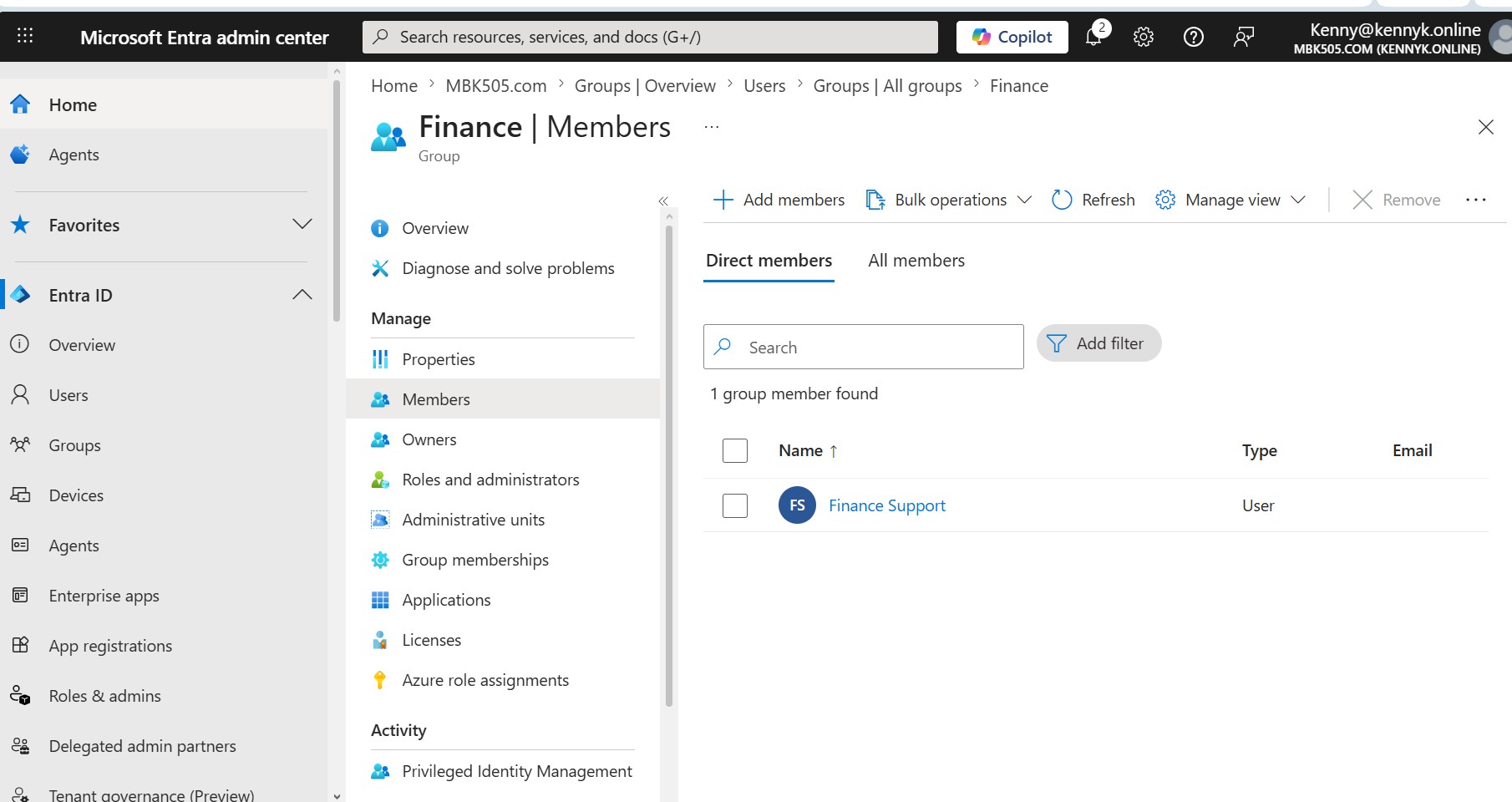
The Microsoft Entra admin center showing the Finance group's Members blade. One direct member is listed โ€” Finance Support (User type) โ€” the dedicated account used for device enrolment and Intune policy targeting across the Finance department.
Entra ID All Groups
๐Ÿ” Click to expand
Entra ID ยท Groups ยท Directory
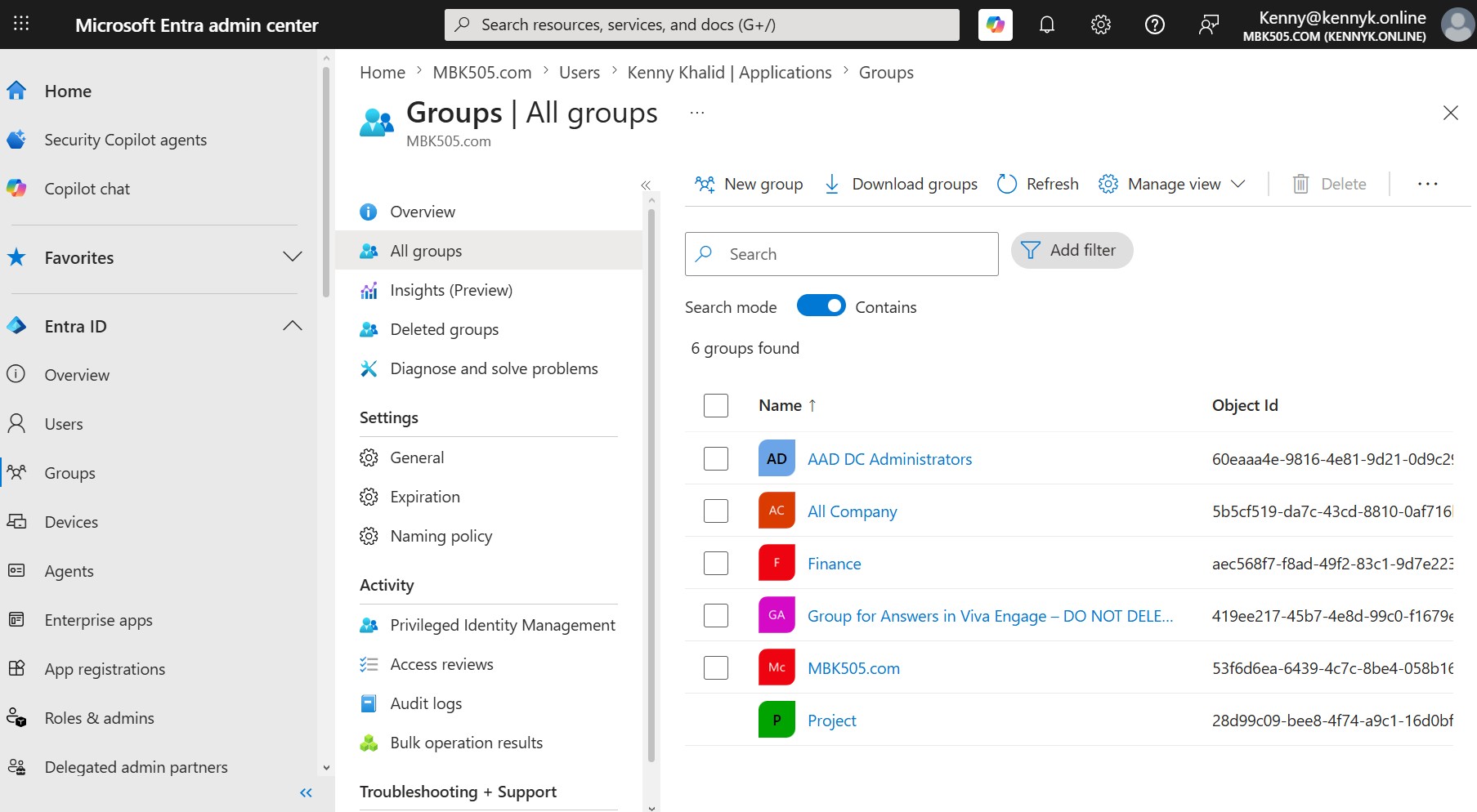
All Groups โ€” Tenant Directory
The All groups blade for MBK505.com, listing six security and Microsoft 365 groups including All Company, Finance, Project and AAD DC Administrators. Demonstrates structured group design that underpins licensing, Intune targeting and Conditional Access scoping.
Entra Roles and Administrators Admin Units
๐Ÿ” Click to expand
Entra ID ยท Roles ยท Admin Units
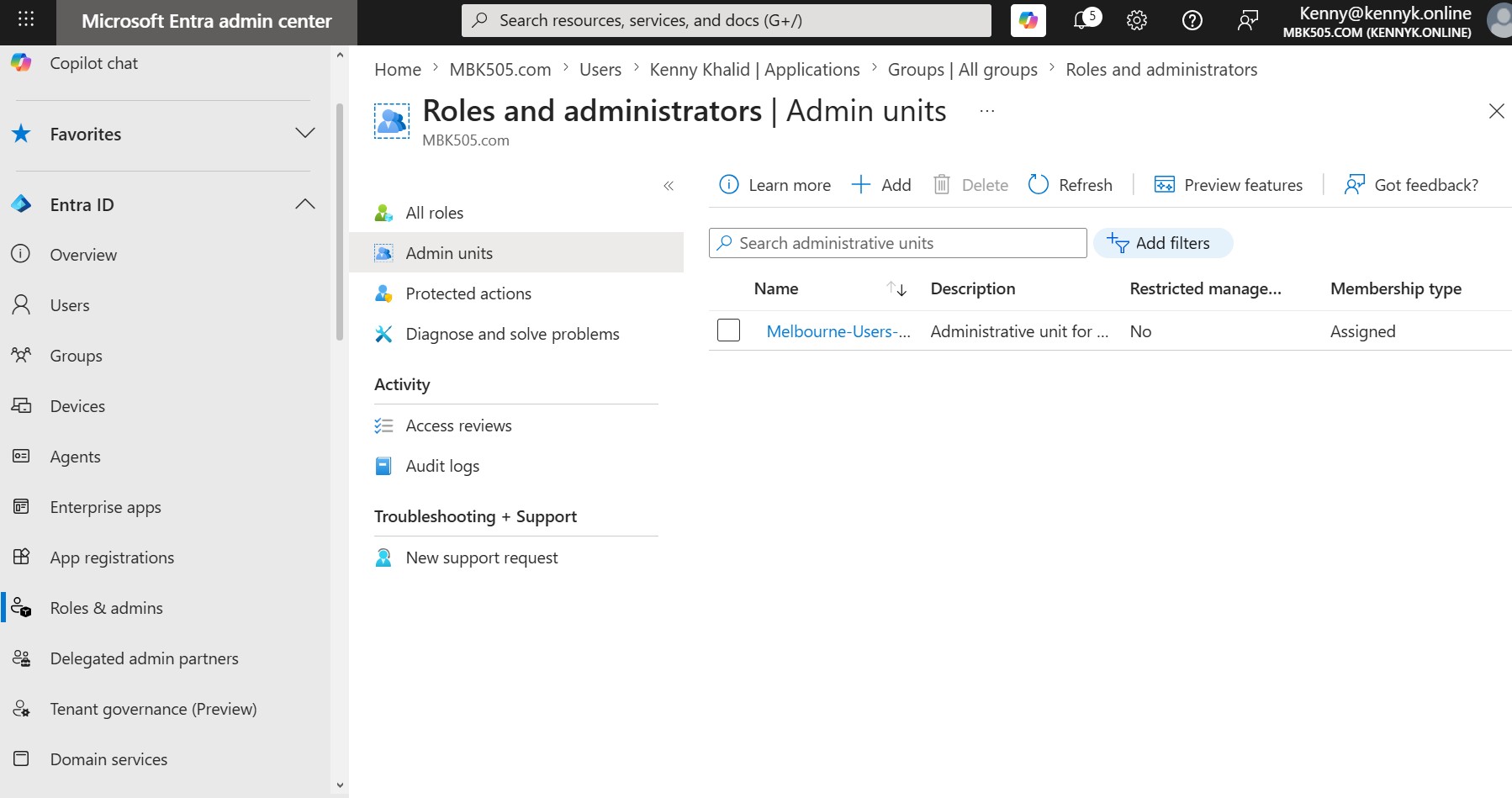
Administrative Unit โ€” Melbourne-Users
The Roles and administrators › Admin units page showing the Melbourne-Users administrative unit. AUs are used to delegate scoped administration over a specific subset of users and groups โ€” applying least-privilege role assignments without granting tenant-wide permissions.
Entra Devices Overview
๐Ÿ” Click to expand
Entra ID ยท Devices ยท Overview
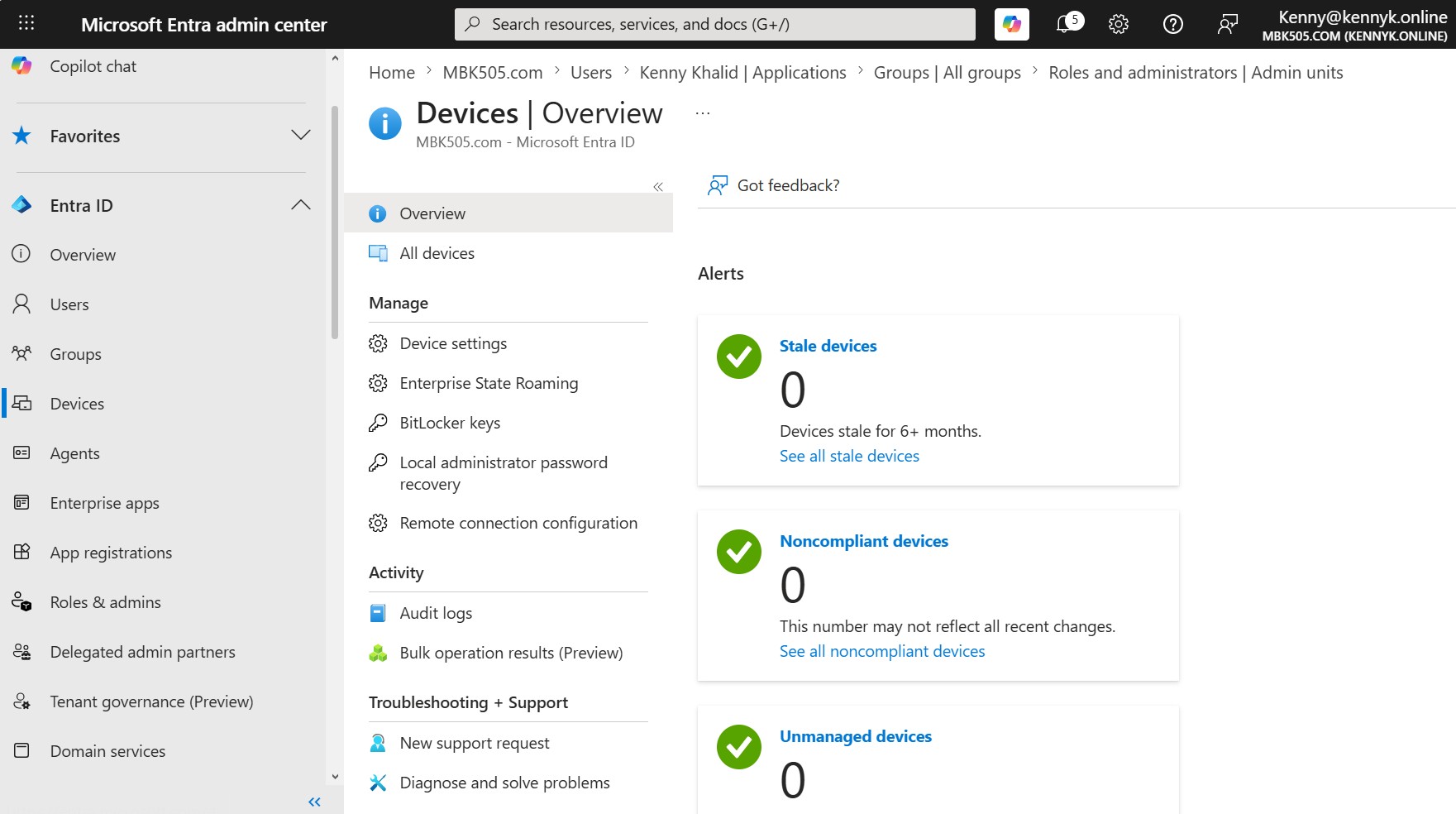
Devices Overview โ€” Health & Compliance
The Entra Devices › Overview dashboard reporting zero stale, noncompliant and unmanaged devices. A clean device posture confirms that joined endpoints are actively reporting, Intune-managed and policy-compliant.
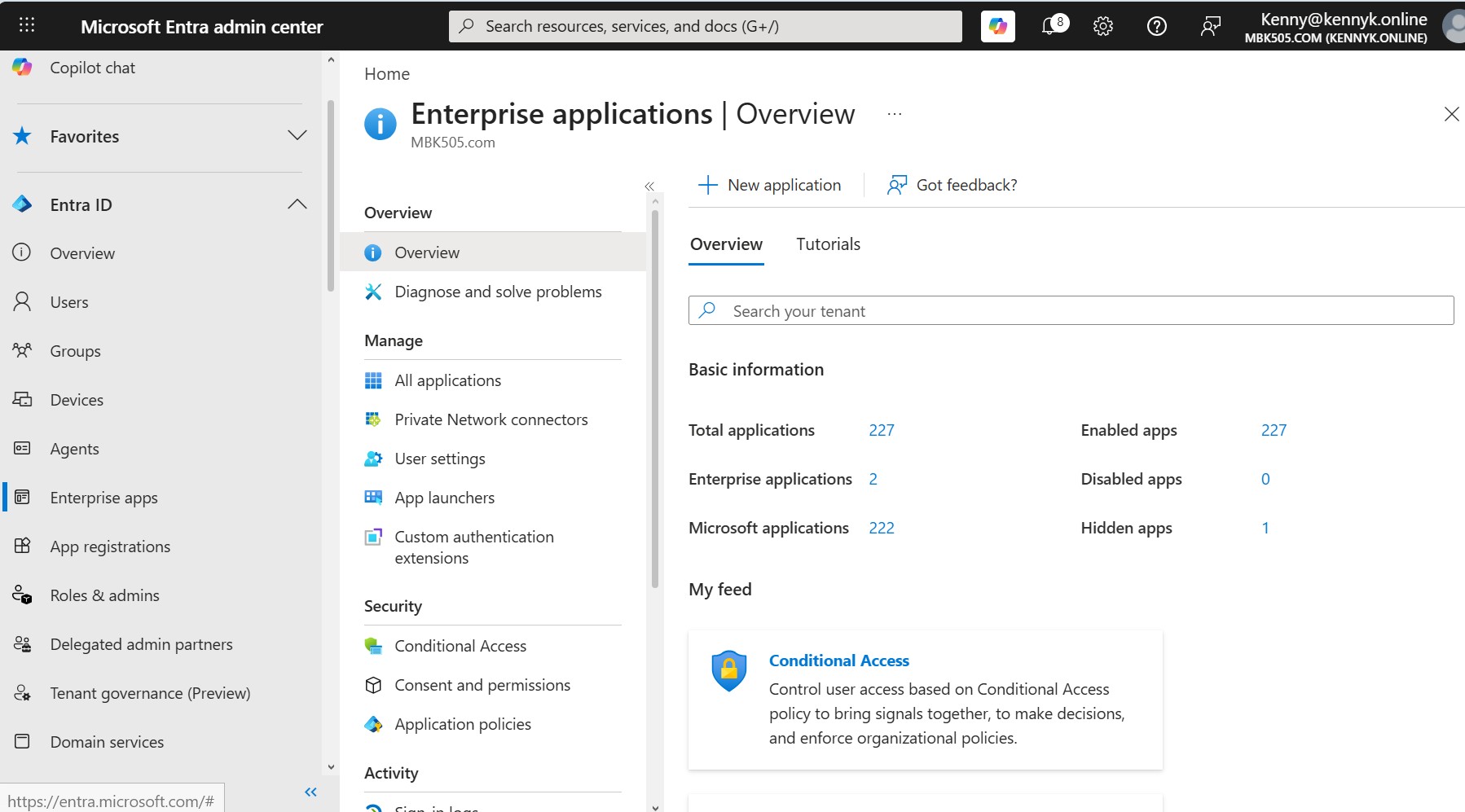
Entra Enterprise Applications Overview
๐Ÿ” Click to expand
Entra ID ยท Enterprise Apps ยท Overview
Enterprise Applications โ€” Tenant Inventory
The Enterprise applications overview reporting 227 total applications registered in the tenant (227 enabled, 0 disabled). Provides a single pane to govern single sign-on, user assignment, provisioning and consent across every SaaS integration.
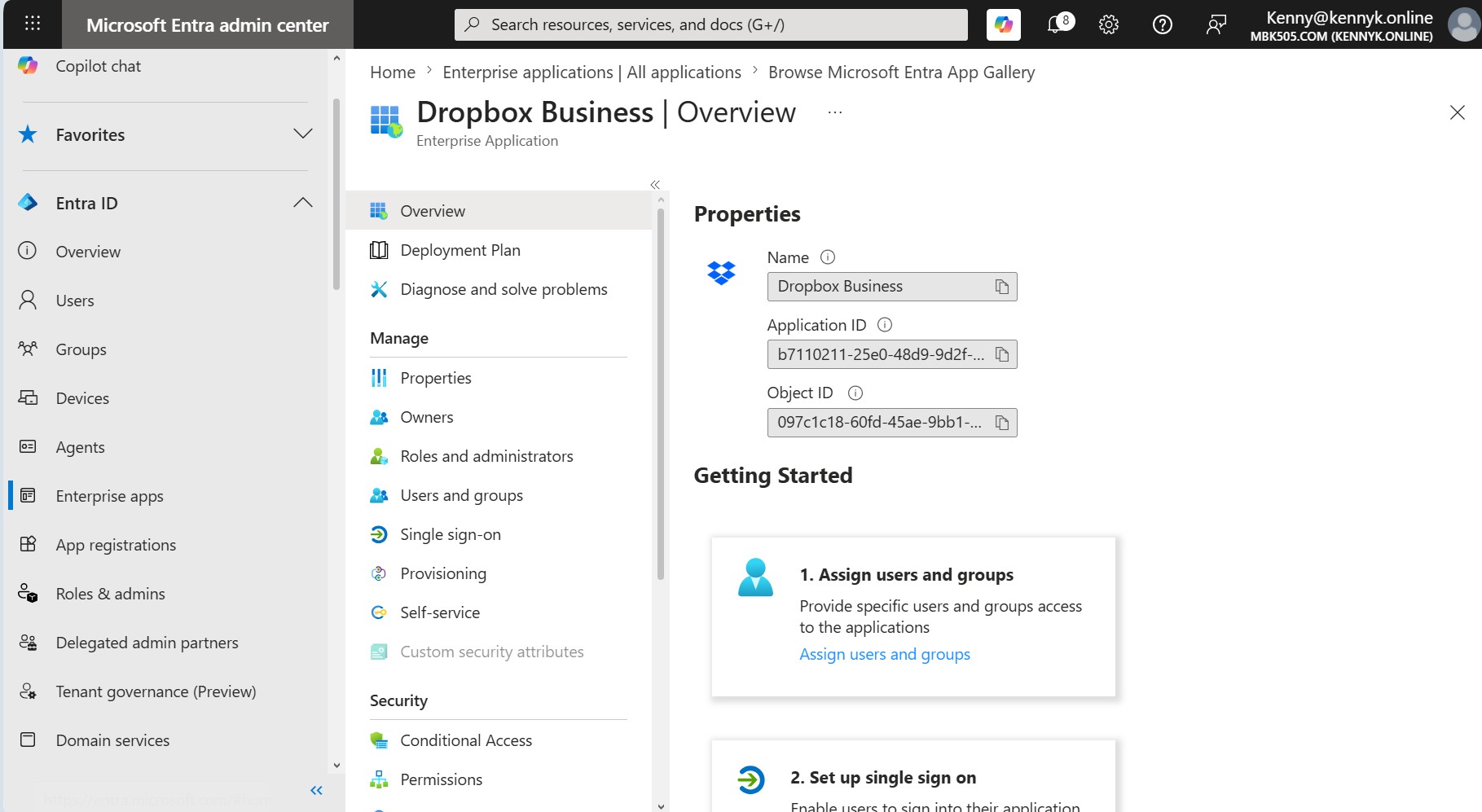
Dropbox Business Enterprise Application
๐Ÿ” Click to expand
Entra ID ยท Enterprise Apps ยท SSO
Dropbox Business โ€” Enterprise Application
The overview blade for the Dropbox Business enterprise application added from the Microsoft Entra App Gallery. Shows the Application ID, Object ID and the standard configuration path: assign users & groups, set up single sign-on, configure provisioning and apply Conditional Access.
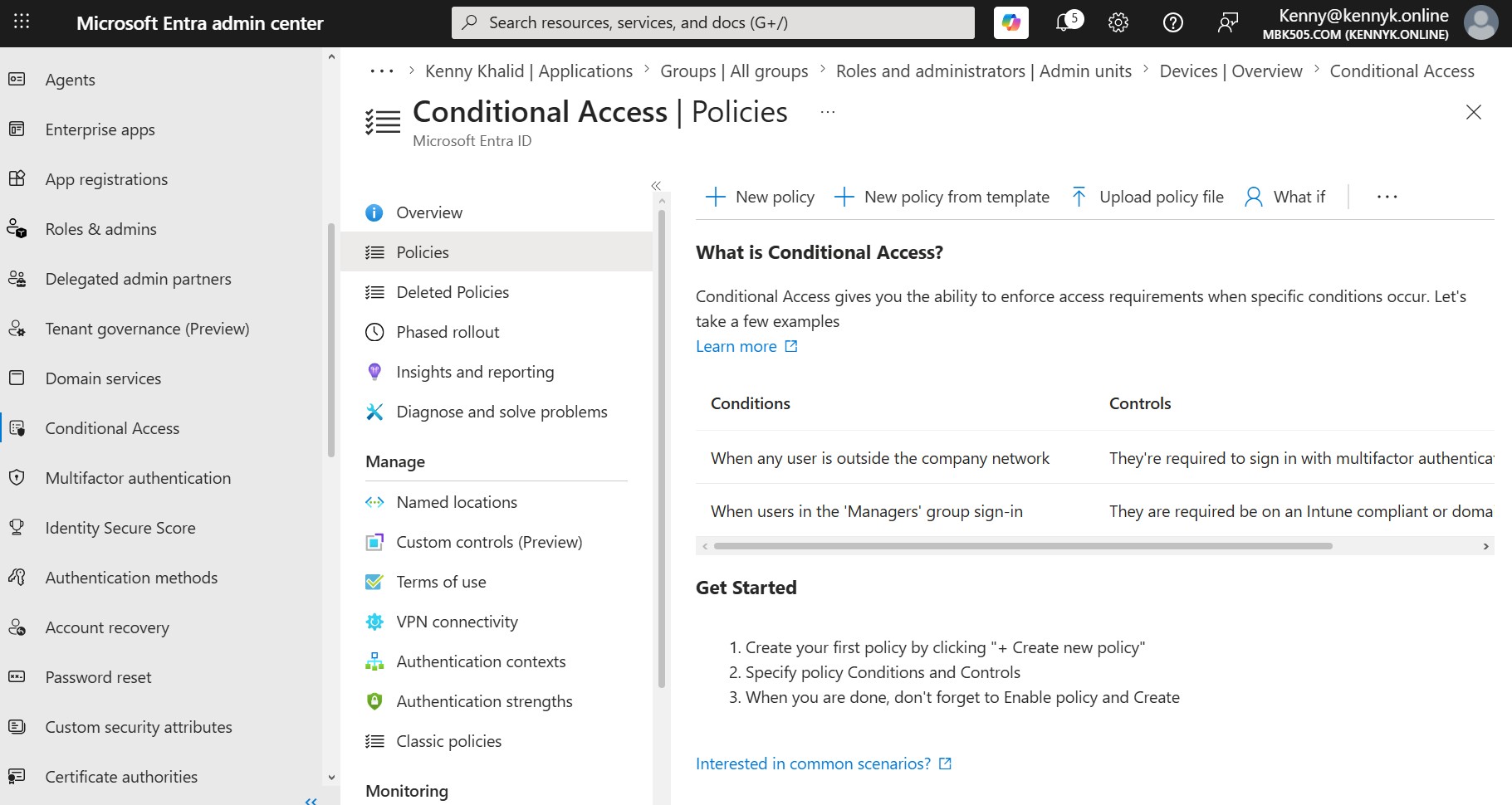
Entra Conditional Access Policies
๐Ÿ” Click to expand
Entra ID ยท Security ยท Conditional Access
Conditional Access โ€” Policy Console
The Conditional Access › Policies console used to enforce signal-based access controls โ€” requiring MFA for users outside the corporate network and restricting Managers group sign-ins to Intune-compliant or domain-joined devices. Core building block of the tenant's Zero Trust posture.
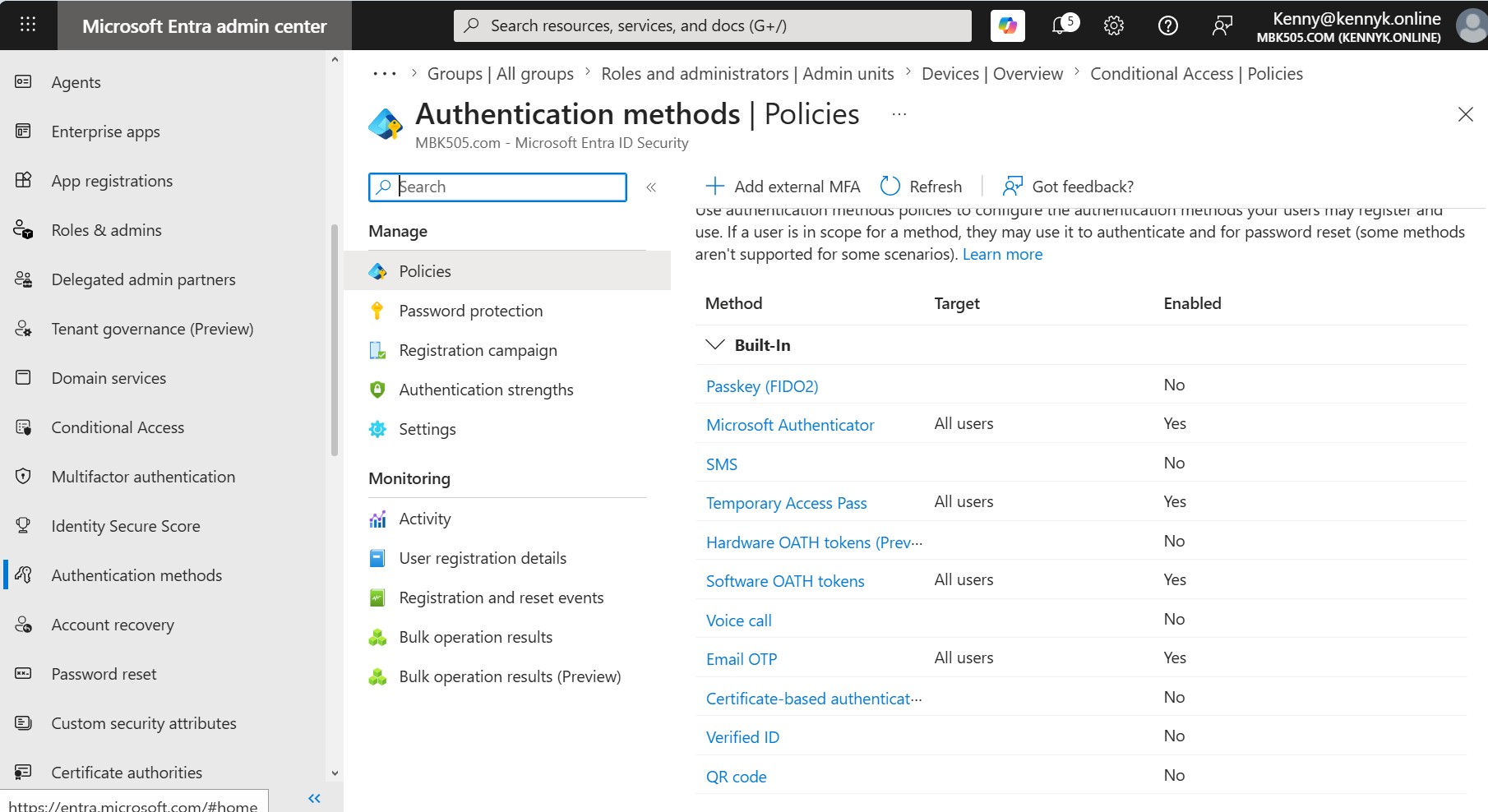
Entra Authentication Methods Policies
๐Ÿ” Click to expand
Entra ID ยท Security ยท Authentication
Authentication Methods โ€” Strong-Auth Policy
The Authentication methods › Policies blade with phishing-resistant and modern factors enabled for all users โ€” Microsoft Authenticator, Temporary Access Pass, Software OATH tokens and Email OTP. SMS and Voice are intentionally disabled to eliminate weaker MFA paths.
Entra Audit Logs
๐Ÿ” Click to expand
Entra ID ยท Monitoring ยท Audit Logs
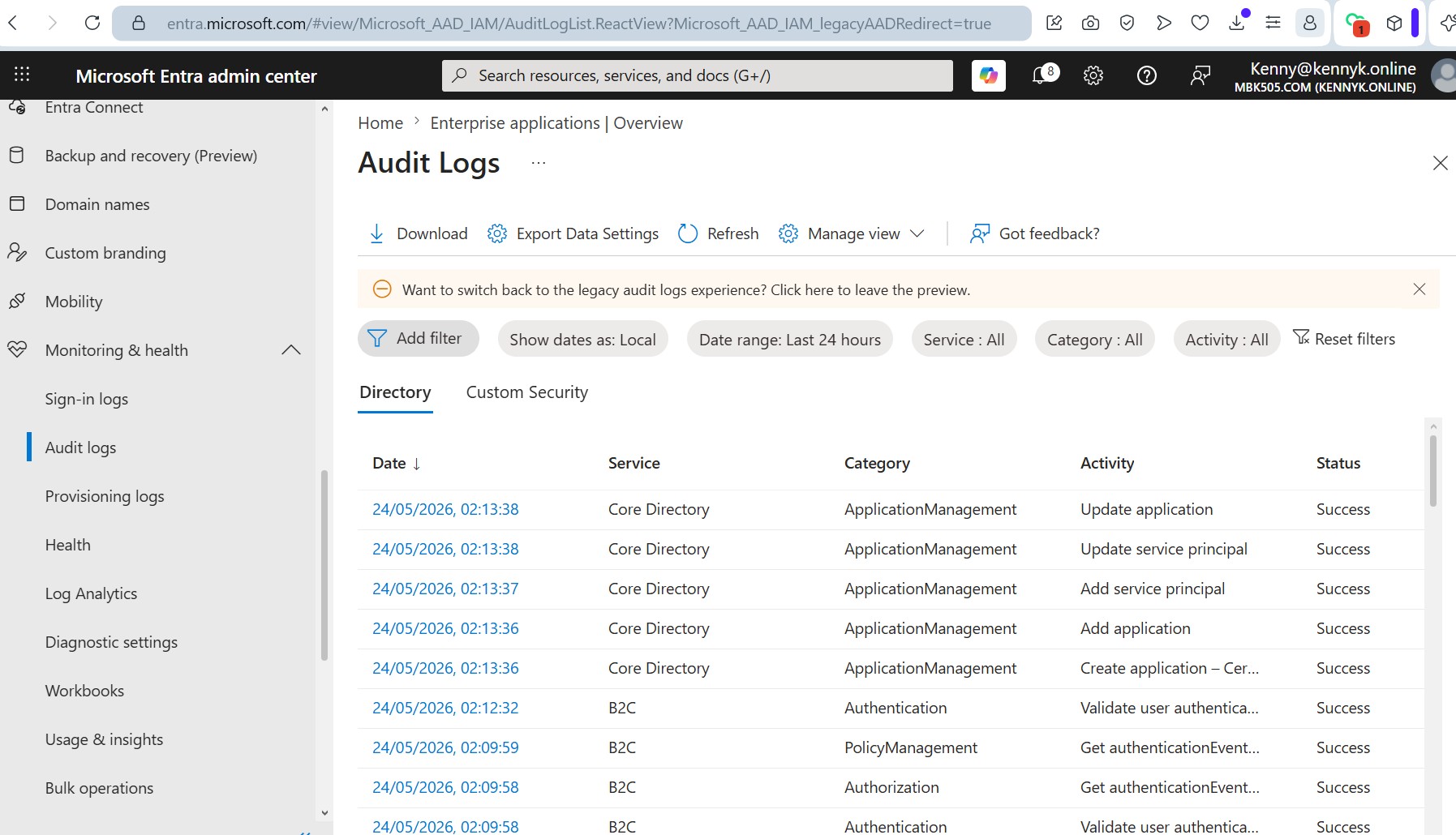
Audit Logs โ€” Directory Activity Trail
The Monitoring & health › Audit logs view filtered to directory activity, capturing Add / Update application, Add service principal and B2C authentication events. Essential for change tracking, incident investigation and compliance evidence.
Microsoft 365 E5 License Management
๐Ÿ” Click to expand
M365 Admin ยท Licensing ยท E5
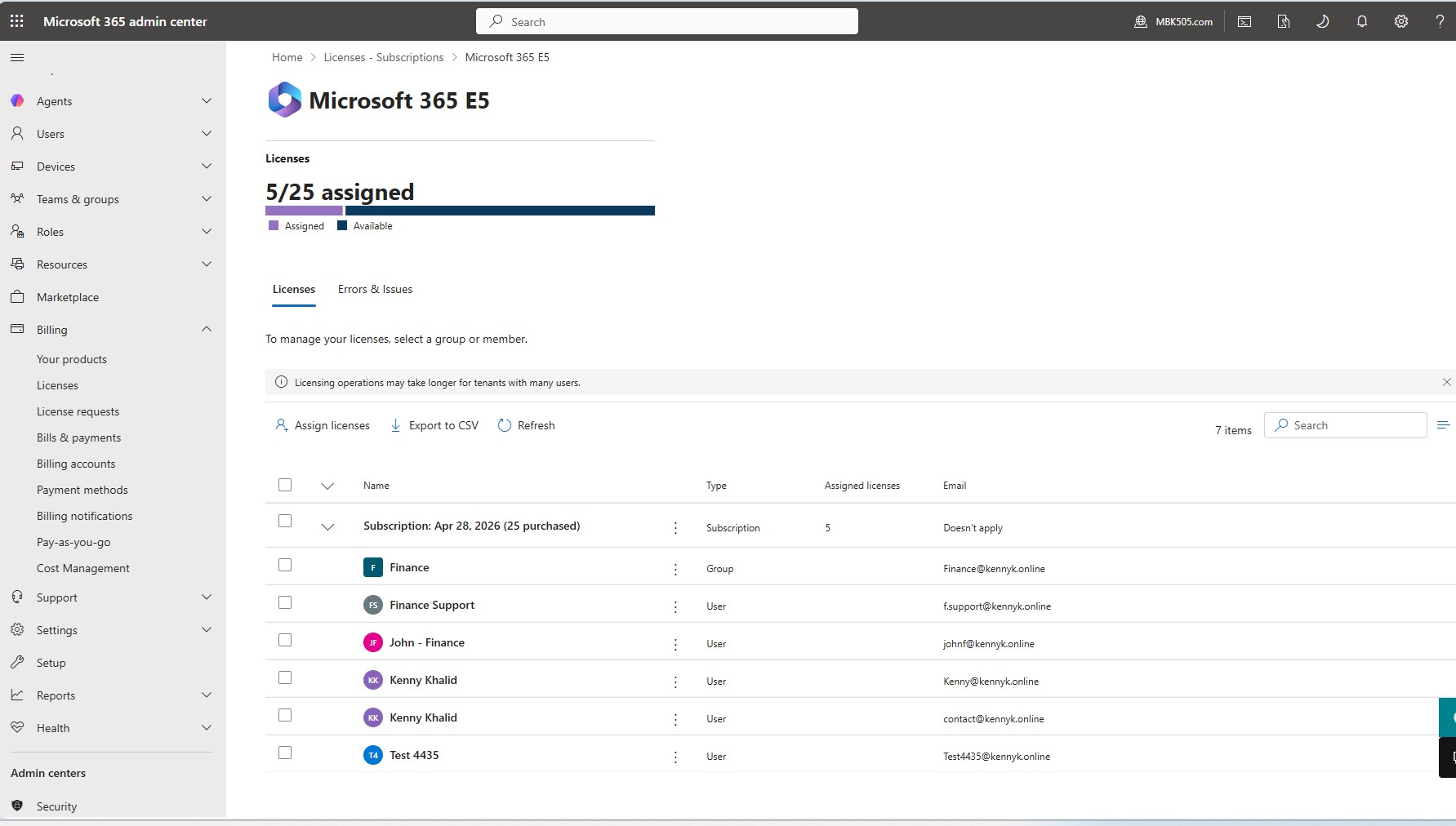
Microsoft 365 E5 โ€” License Assignment
The Microsoft 365 E5 licensing page in the M365 Admin Center showing 5 of 25 licences assigned, with group-based assignment to the Finance group plus direct assignments to individual users. Demonstrates hybrid licensing strategy and license-consumption visibility.
Entra ID All Users
๐Ÿ” Click to expand
Entra ID ยท Users ยท Directory
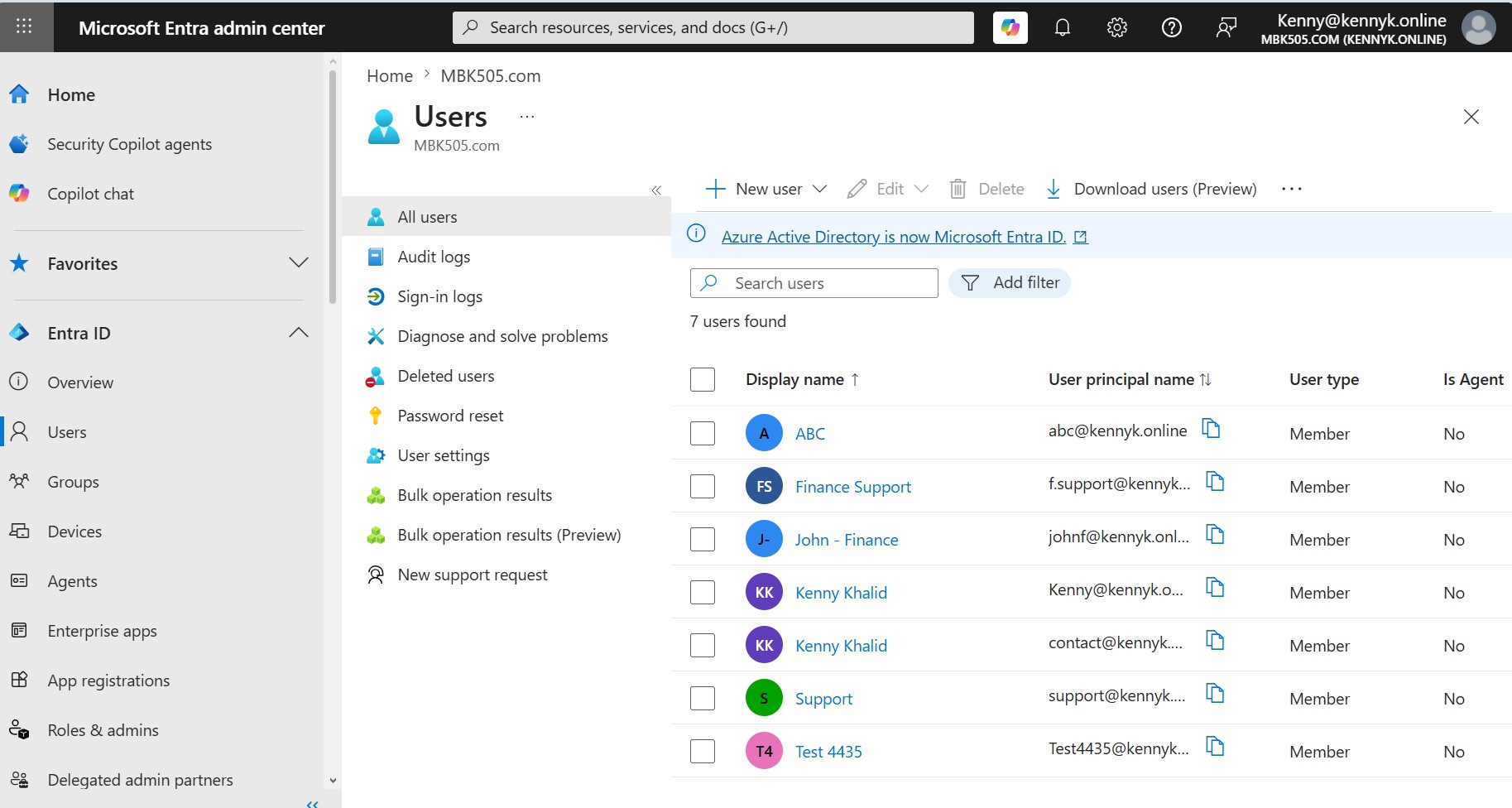
All Users โ€” Full Tenant Directory
The Users blade for MBK505.com listing all 7 provisioned user accounts: ABC, Finance Support, John - Finance, Kenny Khalid ร—2, Support and Test 4435 โ€” all Member type. Demonstrates structured identity provisioning covering dedicated service accounts, department users and shared identities across the kennyk.online domain.
Entra User Profile Overview
๐Ÿ” Click to expand
Entra ID ยท Users ยท Profile
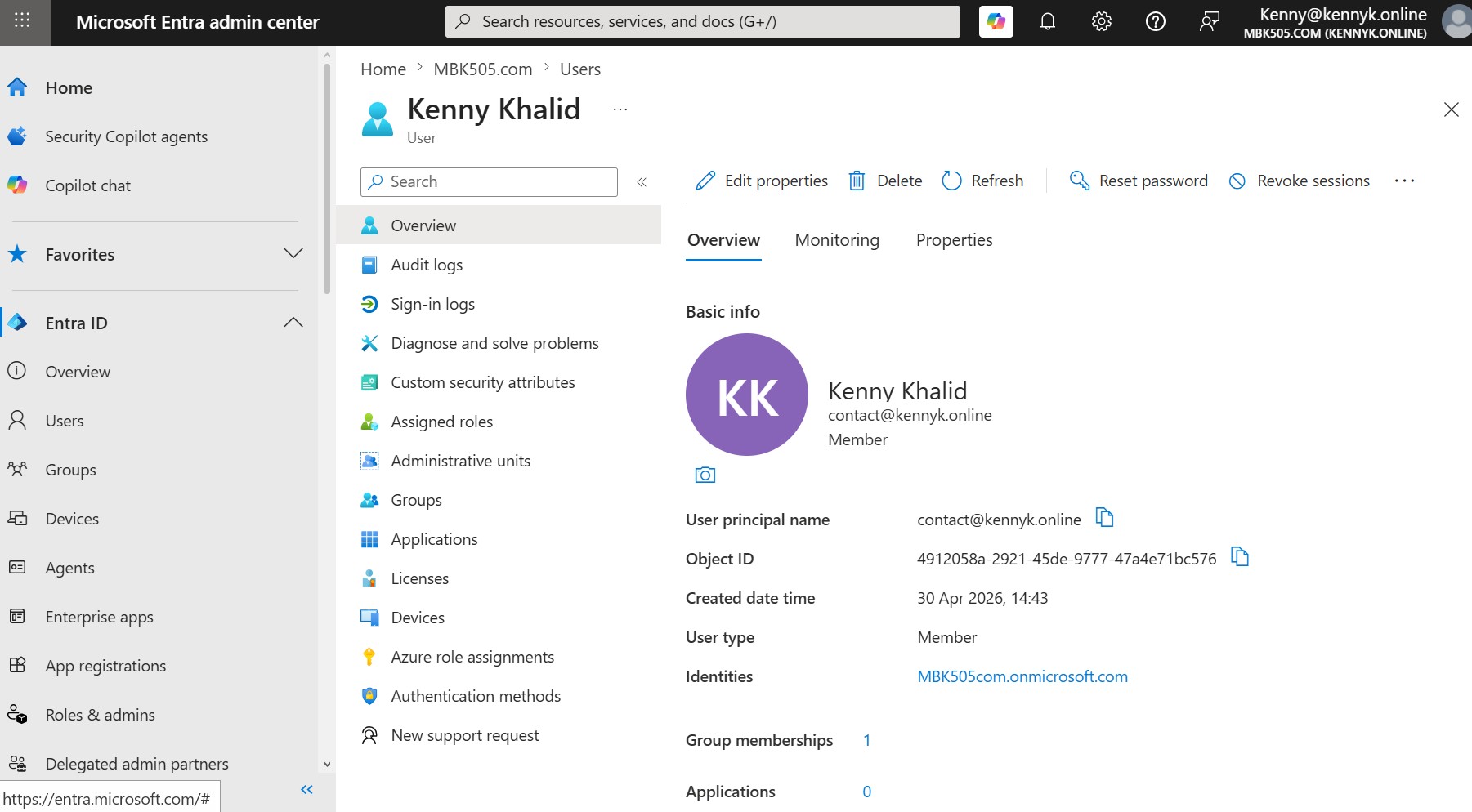
User Profile โ€” Kenny Khalid (contact@kennyk.online)
The Entra ID user profile for Kenny Khalid (contact@kennyk.online) showing full identity attributes: Object ID, UPN, created date, User type (Member), and identity source (MBK505com.onmicrosoft.com). The profile blade also exposes direct access to Audit logs, Sign-in logs, Assigned roles, Administrative units, Groups, Devices, Licences and Authentication methods โ€” the complete user management surface.
Entra Sign-in Events Log
๐Ÿ” Click to expand
Entra ID ยท Monitoring ยท Sign-in Logs
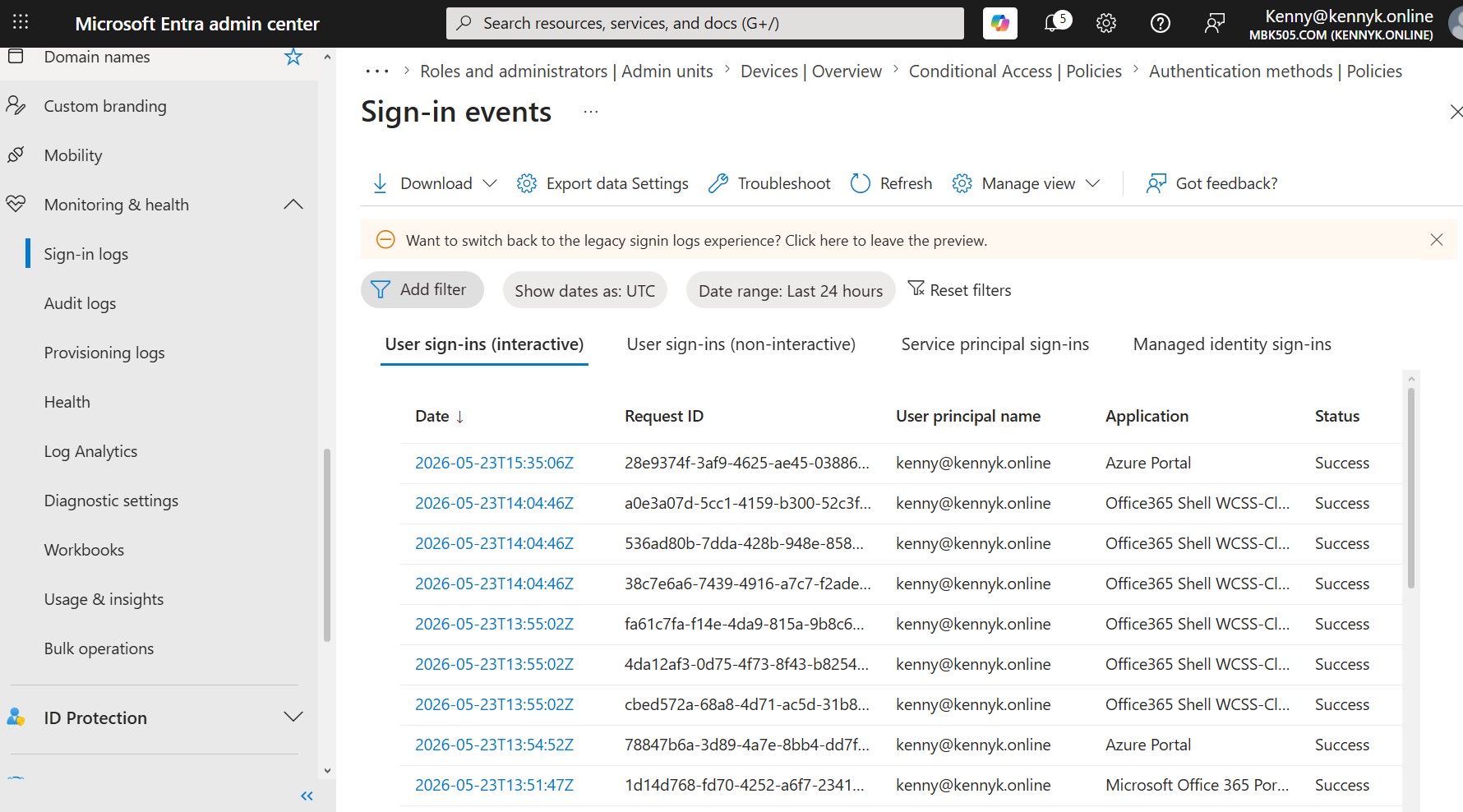
Sign-in Events โ€” Interactive User Sign-ins
The Monitoring & health › Sign-in logs view showing real-time interactive sign-in events for kenny@kennyk.online across Azure Portal and Office 365 Shell, all with Success status. The log provides complete forensic data including Request ID, User Principal Name, Application name and UTC timestamp โ€” essential for troubleshooting authentication failures and detecting anomalous access patterns.
Entra Roles and Administrators
๐Ÿ” Click to expand
Entra ID ยท Roles ยท RBAC
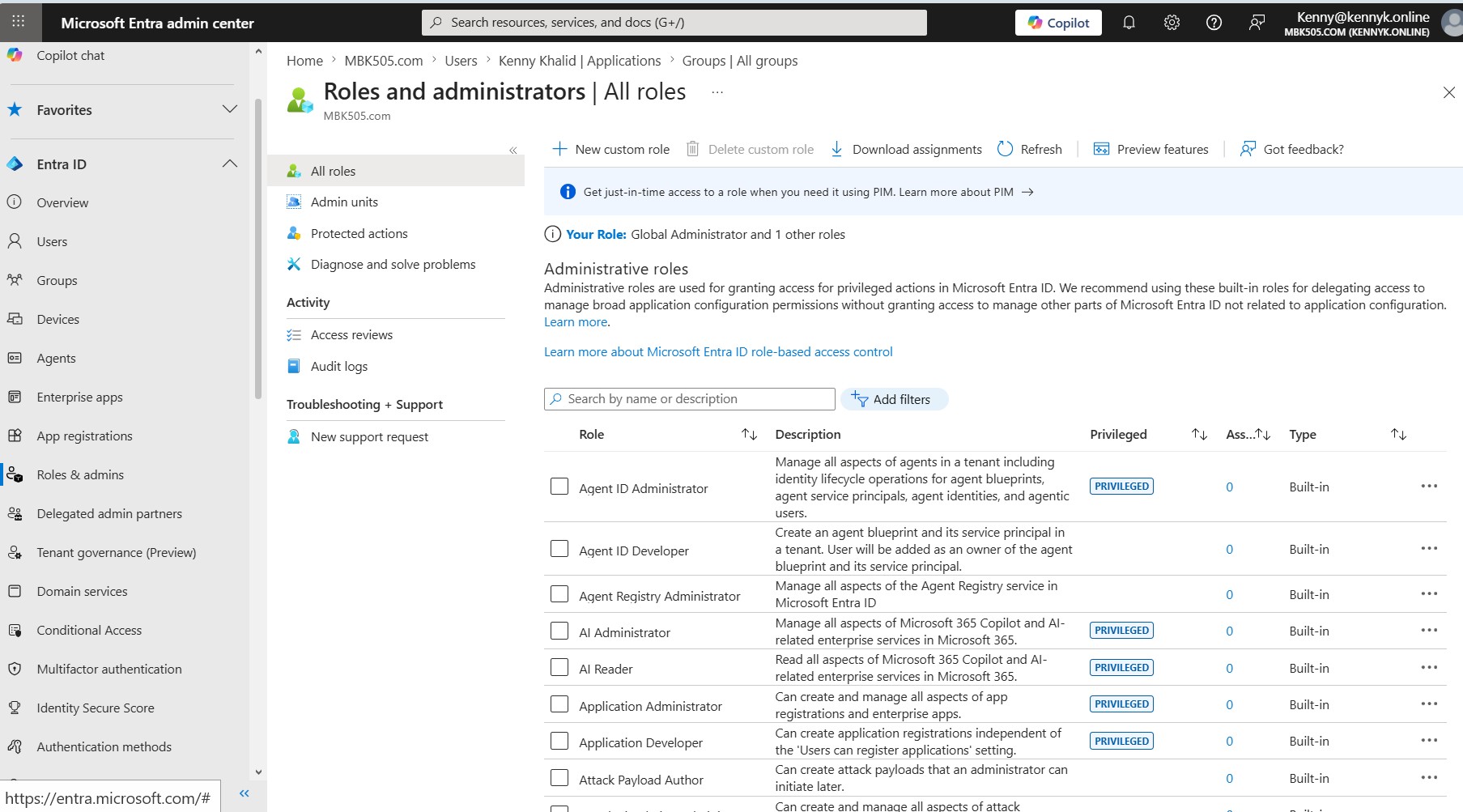
Roles & Administrators โ€” Global Administrator
The Roles and administrators › All roles page confirming the logged-in user holds Global Administrator and 1 other role on the MBK505.com tenant. The full built-in role catalogue is visible including Privileged roles (Application Administrator, AI Administrator) โ€” demonstrating deep familiarity with Entra ID RBAC, Privileged Identity Management (PIM), and the principle of least-privilege role assignment.
๐Ÿ“ง

Exchange Online โ€” Mailbox Management, Mail Flow & Email Security

Configured a full Exchange Online environment on the kennyk.online tenant, covering mailbox provisioning, shared mailbox delegation, distribution groups, mail flow rules, outbound connectors, and complete email authentication (SPF, DKIM, DMARC). Domain health was verified as Healthy in the Microsoft 365 Admin Center, and DKIM signing is active and validated via Namecheap DNS records.
Exchange Manage Mailboxes
๐Ÿ” Click to expand
Exchange ยท Recipients ยท Mailboxes
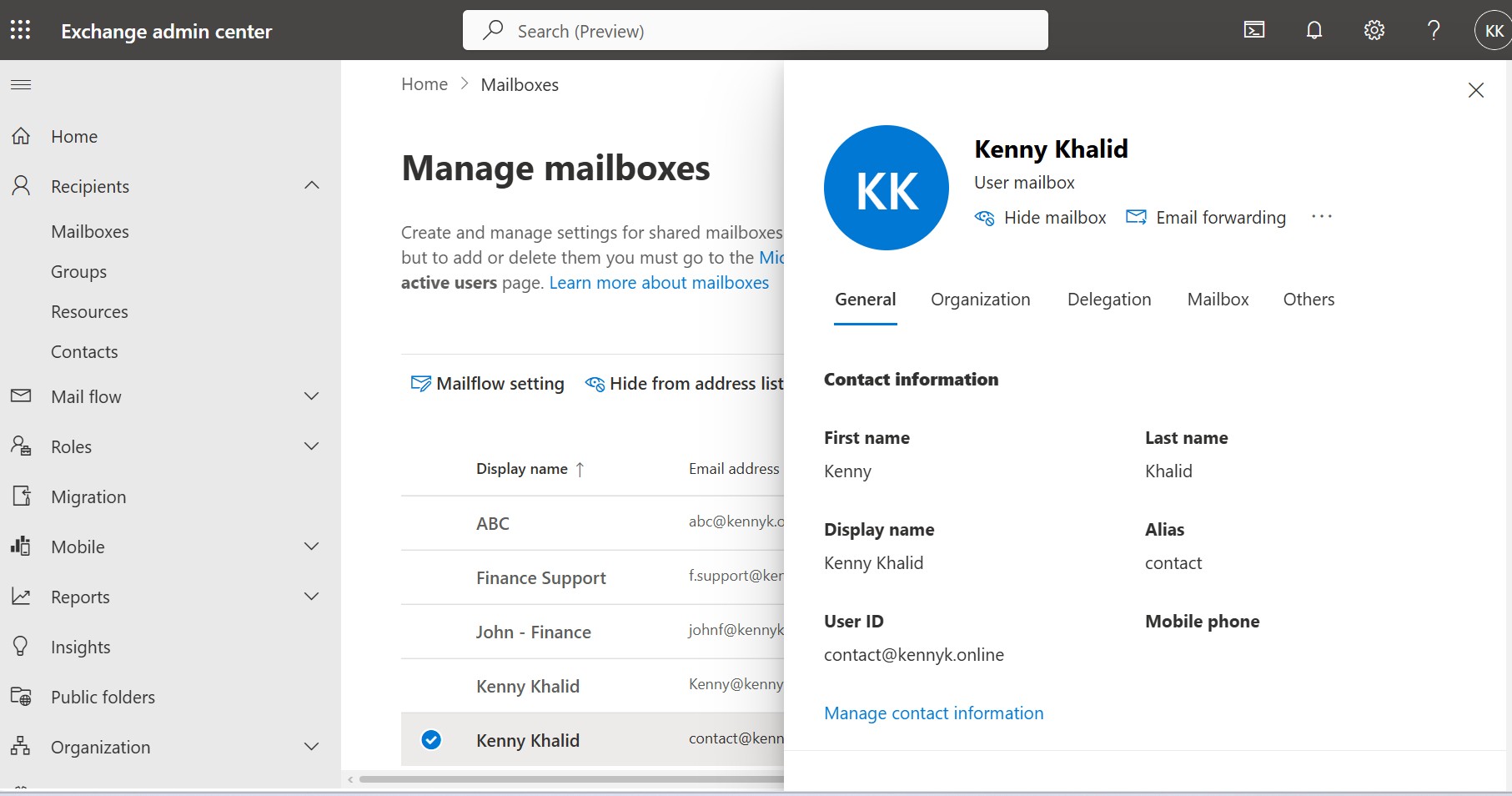
Manage Mailboxes โ€” Multi-User Tenant
The Exchange Admin Center showing the full mailbox list for the kennyk.online tenant, including user mailboxes (ABC, Finance Support, John - Finance, Kenny Khalid ร—2) and the Support shared mailbox. Demonstrates provisioning of multiple mailbox types across a single Microsoft 365 tenant.
Shared Mailbox Inbox in Outlook
๐Ÿ” Click to expand
Exchange ยท Shared Mailbox ยท Outlook
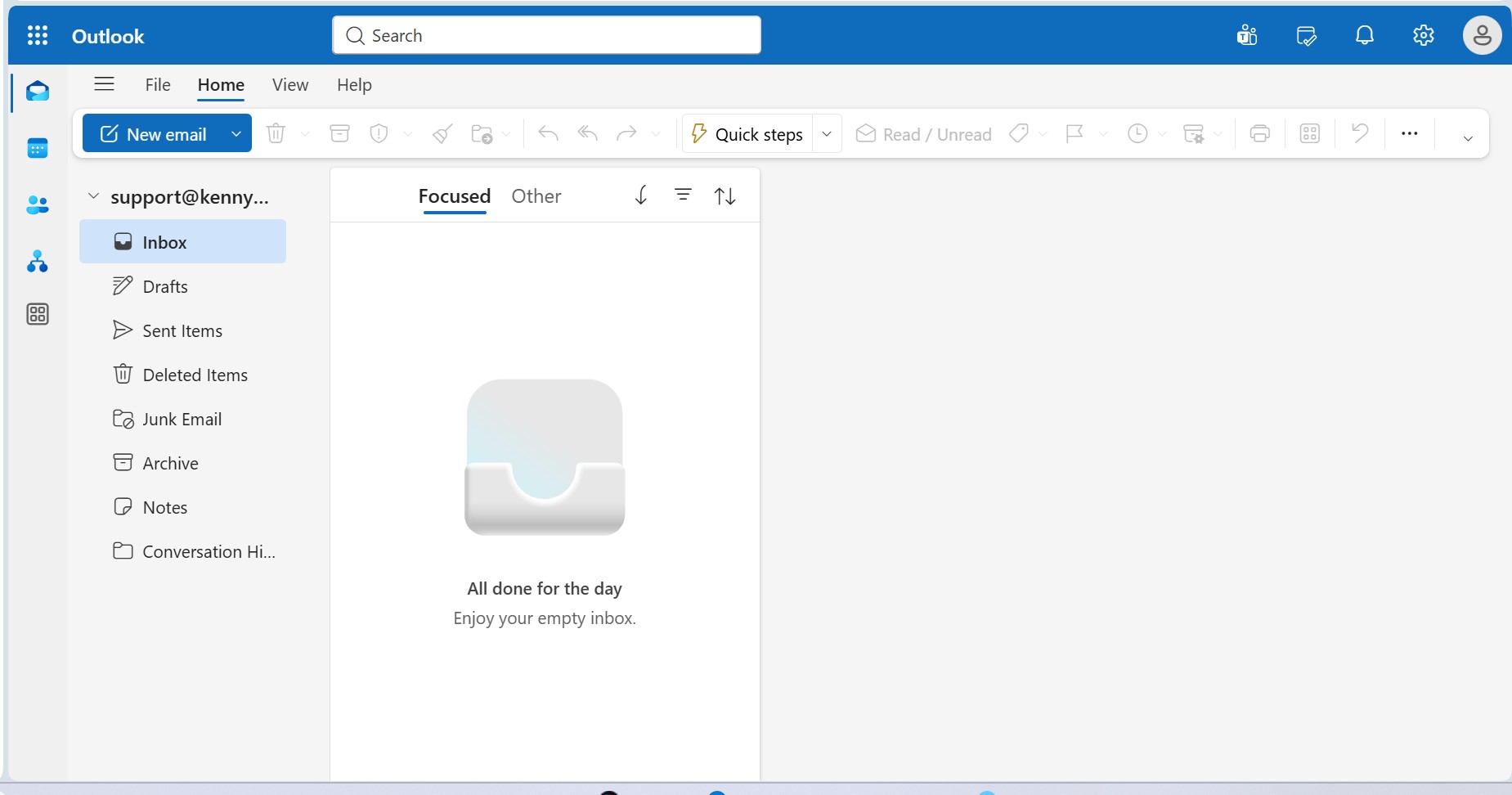
Shared Mailbox Live in Outlook Web
The support@kennyk.online shared mailbox rendered live inside Outlook Web App, showing Focused/Other inbox tabs and a clean empty inbox state. Confirms successful shared mailbox provisioning and delegate access configuration for team-based email management.
Shared Mailbox Delegation
๐Ÿ” Click to expand
Exchange ยท Shared Mailbox ยท Delegation
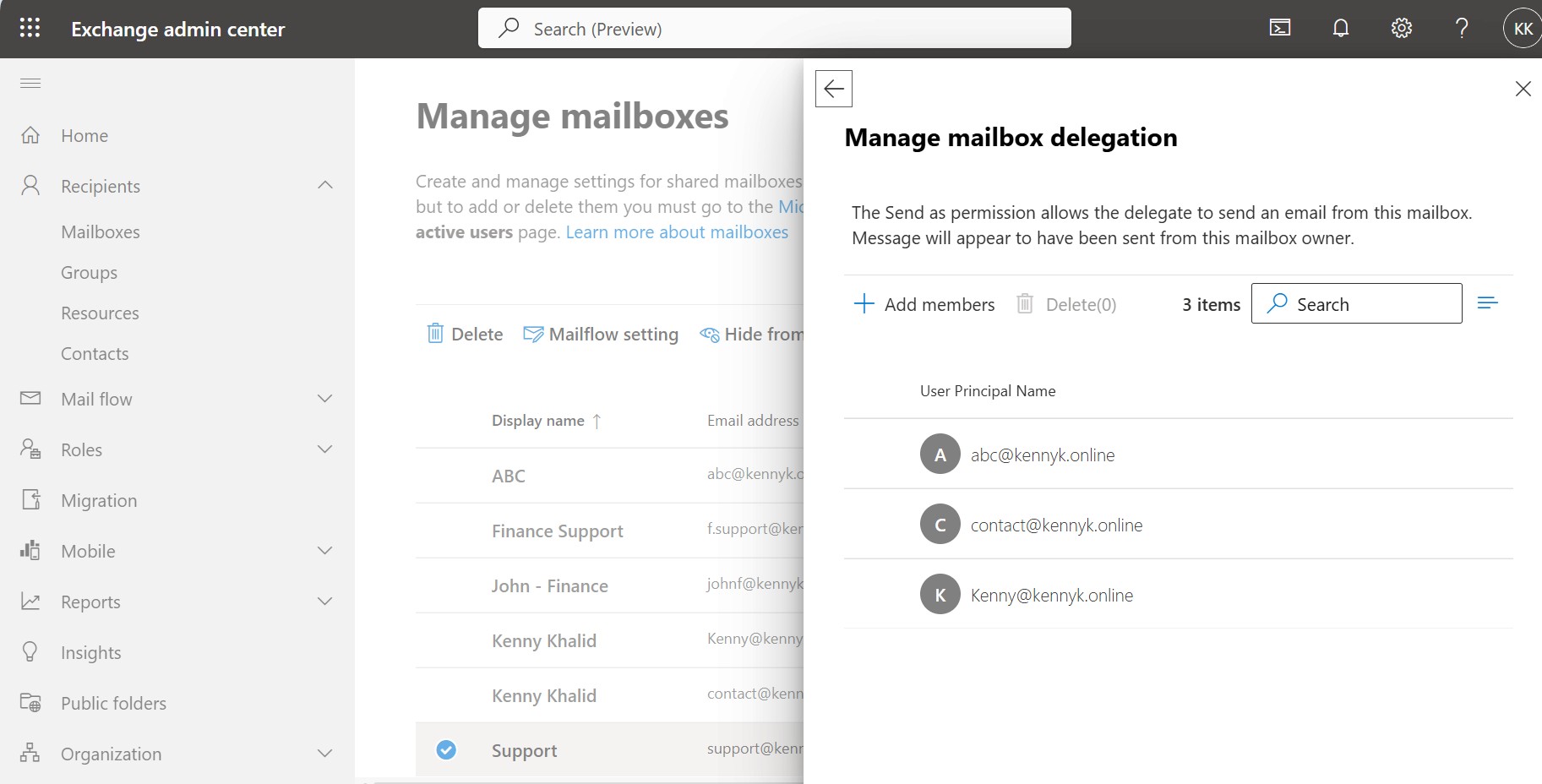
Mailbox Delegation โ€” Send As Permissions
The Manage Mailbox Delegation panel for the Support shared mailbox, listing three delegates with Send As permissions: abc@kennyk.online, contact@kennyk.online, and Kenny@kennyk.online. This allows all three users to send email as the Support mailbox identity.
Exchange Distribution List
๐Ÿ” Click to expand
Exchange ยท Groups ยท Distribution List
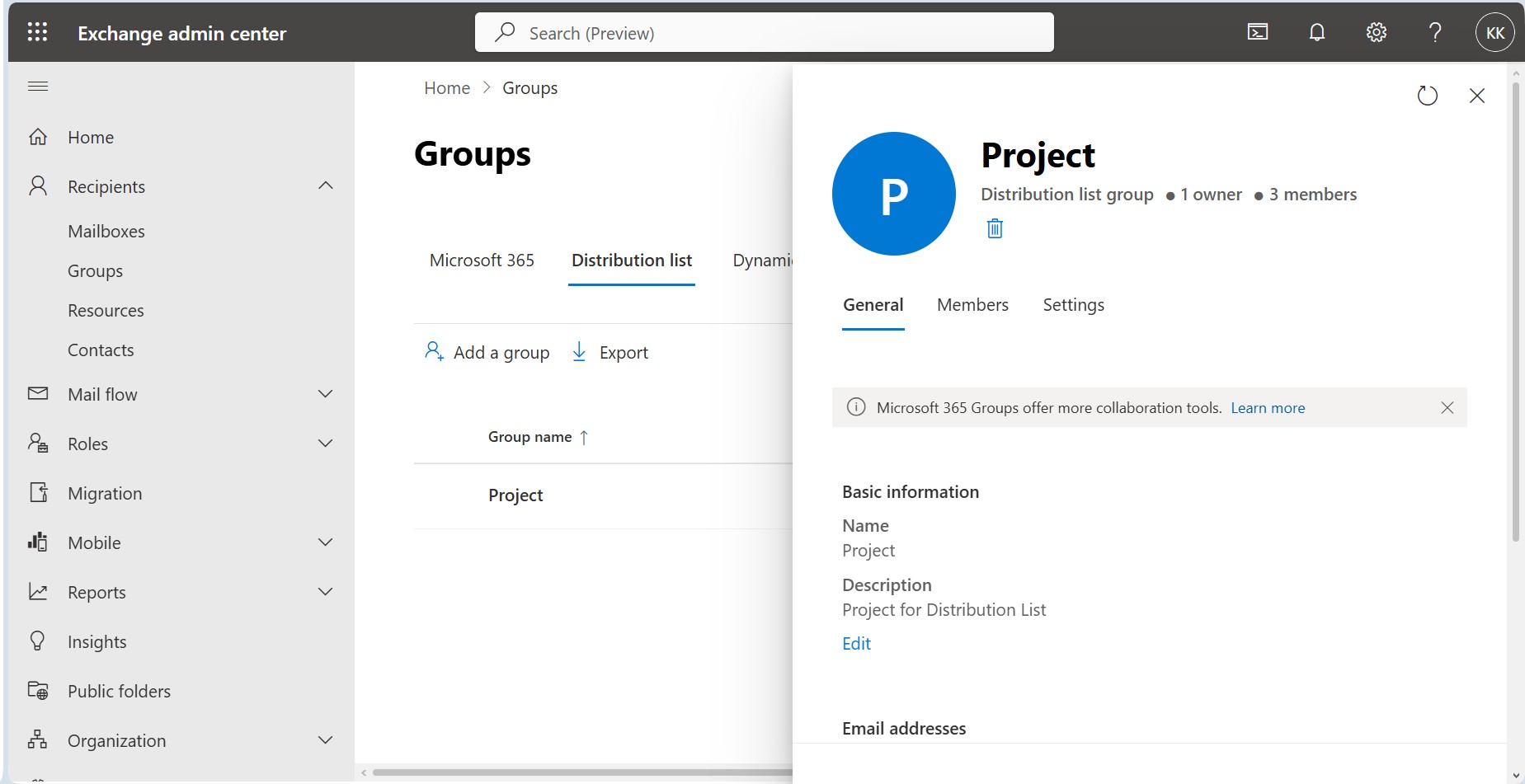
Distribution List Group โ€” Project
The Exchange Admin Center Groups panel showing the Project distribution list group (1 owner, 3 members) created for team-wide email distribution. The group is configured with a description "Project for Distribution List" and can be used to send a single email to all project team members simultaneously.
Exchange Mail Flow Rule Disclaimer
๐Ÿ” Click to expand
Exchange ยท Mail Flow ยท Transport Rules
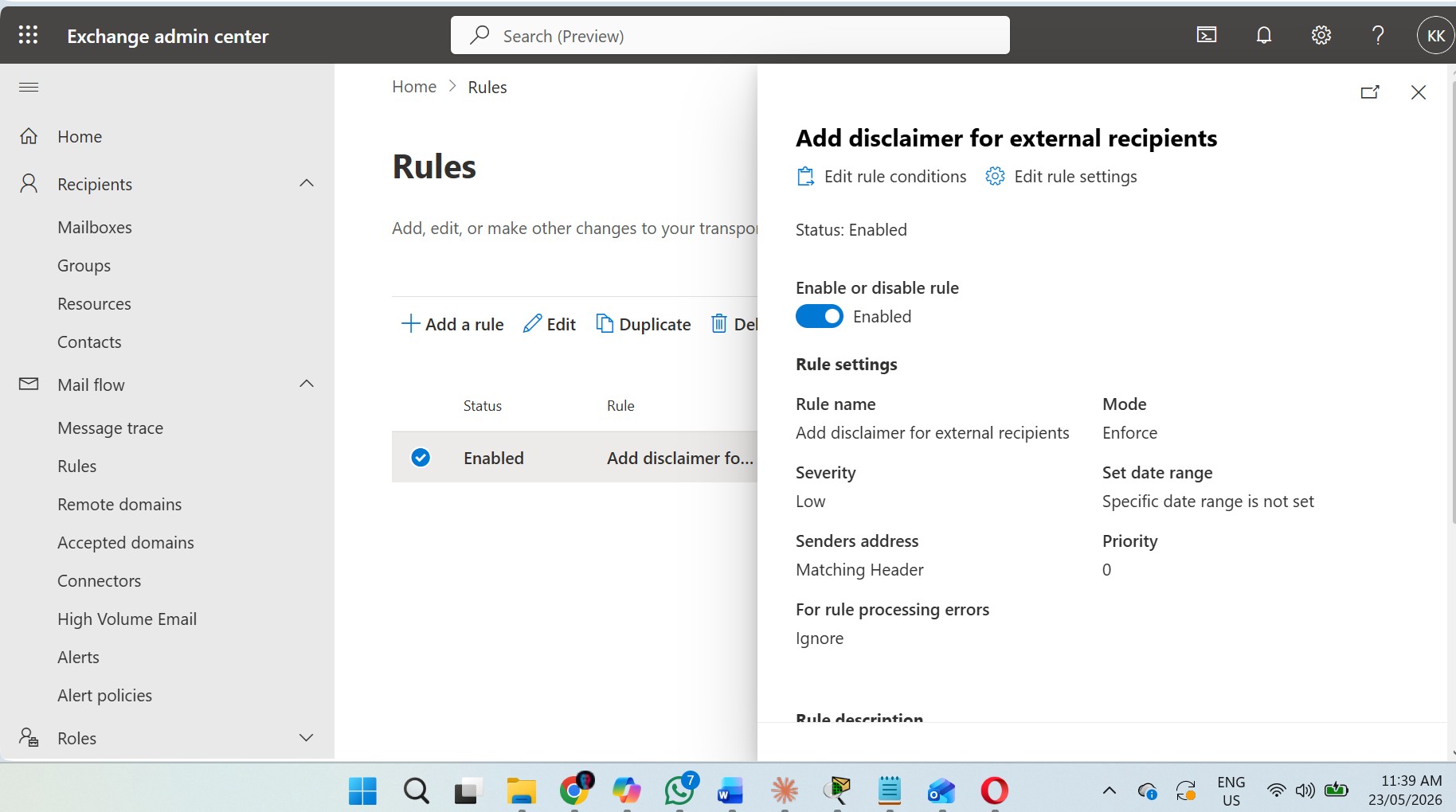
Mail Flow Rule โ€” External Disclaimer
An enabled transport rule named Add disclaimer for external recipients configured in the Exchange Admin Center. Set to Enforce mode with Priority 0, this rule automatically appends a legal disclaimer to all outbound emails sent to external recipients, ensuring compliance and professional communication standards.
Exchange Message Trace
๐Ÿ” Click to expand
Exchange ยท Mail Flow ยท Message Trace
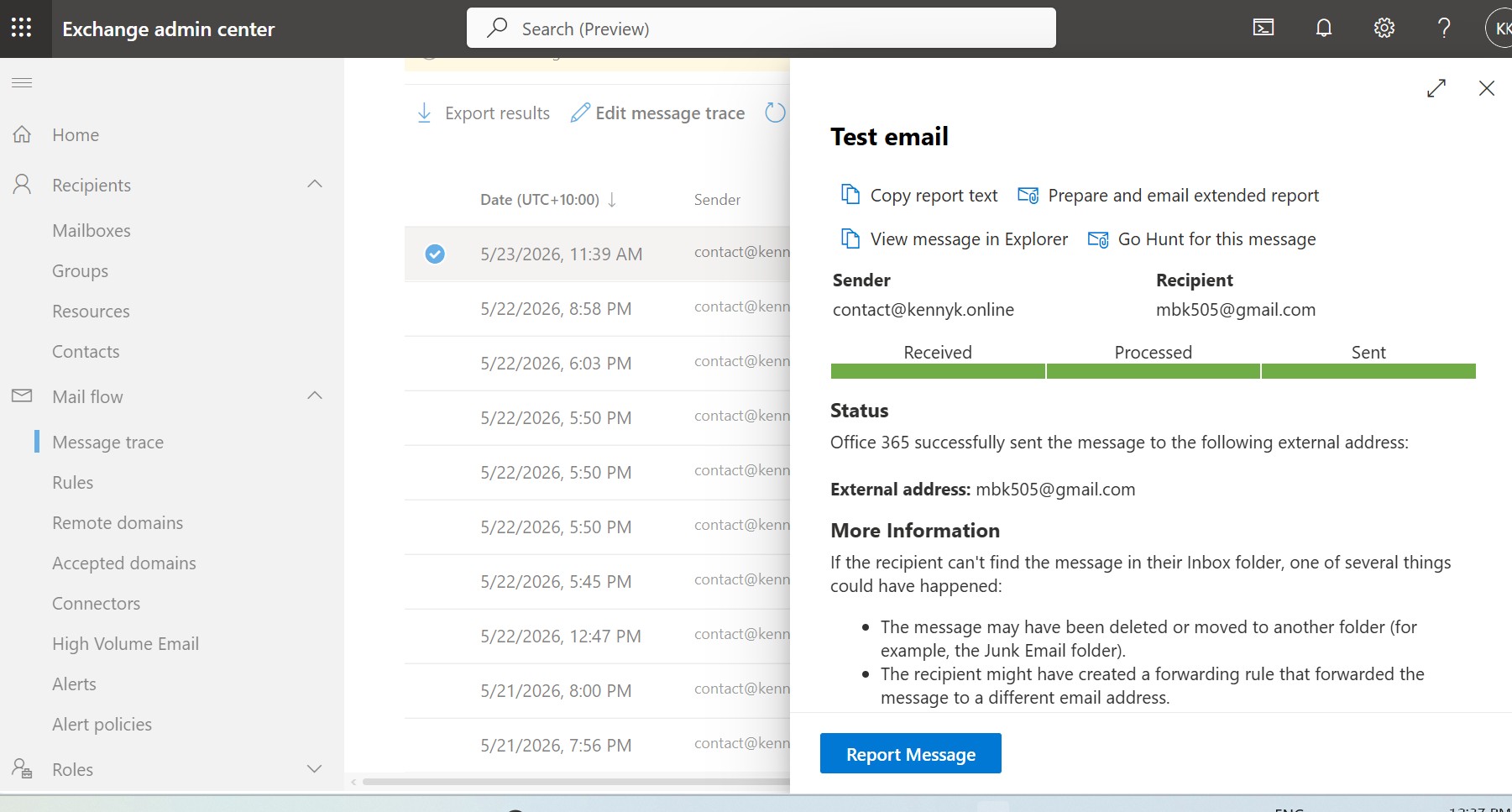
Message Trace โ€” Successful Delivery Verification
The Exchange message trace detail view confirming that Office 365 successfully delivered a test email from contact@kennyk.online to the external address mbk505@gmail.com. All three pipeline stages โ€” Received, Processed, and Sent โ€” show green, verifying end-to-end mail flow functionality.
Exchange Connectors List
๐Ÿ” Click to expand
Exchange ยท Mail Flow ยท Connectors
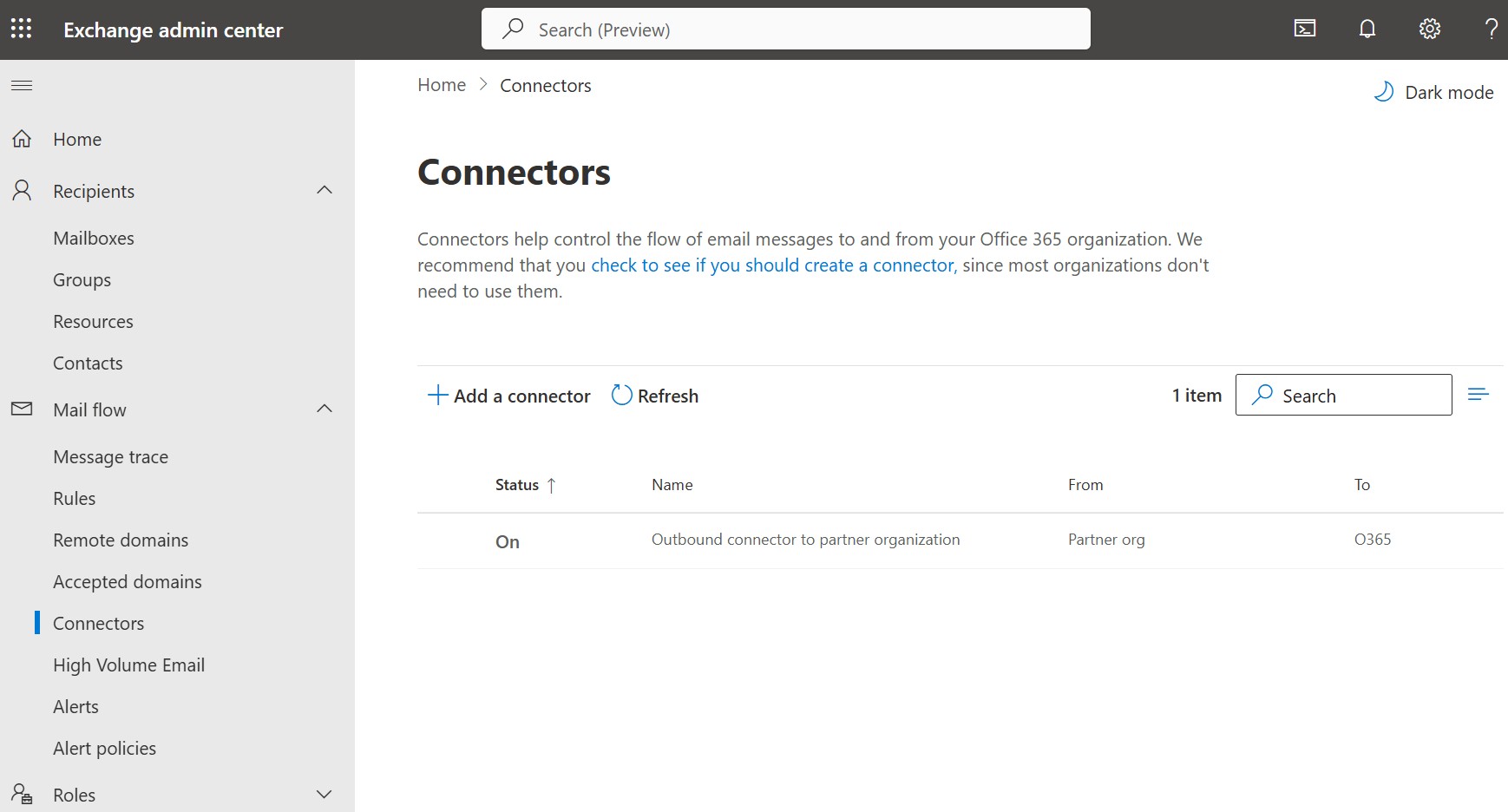
Outbound Connector โ€” Partner Organisation
The Exchange Admin Center Connectors page listing one active connector: Outbound connector to partner organization (Status: On), routing mail from a Partner org to Office 365. Demonstrates configuration of secure mail routing between the kennyk.online tenant and an external partner domain.
Outbound Connector Detail
๐Ÿ” Click to expand
Exchange ยท Connectors ยท Configuration
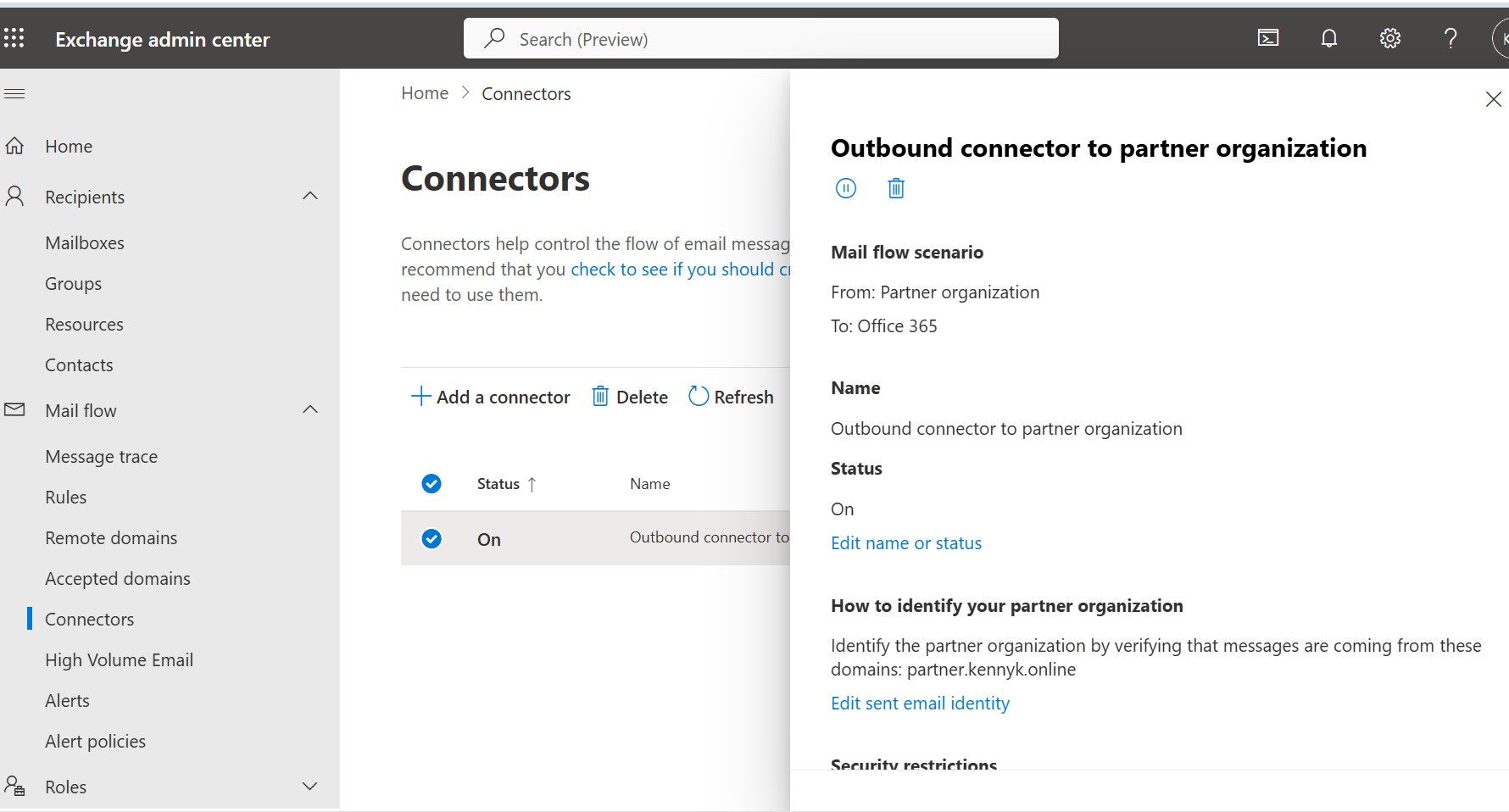
Connector Detail โ€” Partner Domain Identification
The detail panel for the outbound partner connector, showing the mail flow scenario (Partner org โ†’ Office 365) and partner identification via domain verification: messages from partner.kennyk.online are authenticated before being accepted into the tenant, enforcing secure inbound routing from the partner organisation.
DKIM List in Defender
๐Ÿ” Click to expand
Exchange ยท Email Auth ยท DKIM
DKIM Signing โ€” kennyk.online Enabled
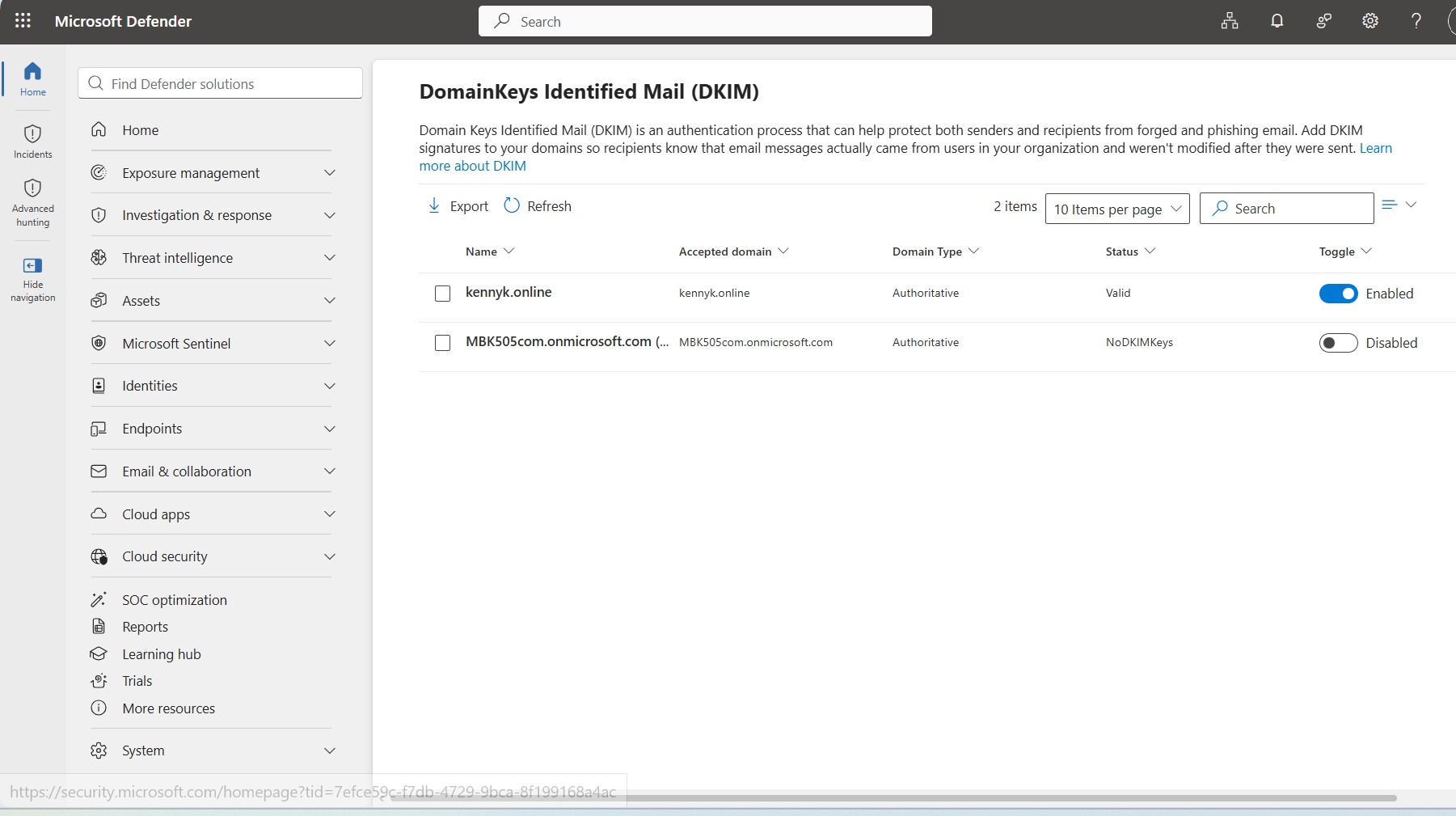
The DomainKeys Identified Mail (DKIM) management page in Microsoft Defender, showing kennyk.online with Status: Valid and Toggle: Enabled. DKIM signing is active for the authoritative domain, ensuring outbound emails carry a cryptographic signature that recipients can verify โ€” protecting against spoofing and improving deliverability.
DNS DKIM CNAME Records Namecheap
๐Ÿ” Click to expand
Exchange ยท DNS ยท Email Authentication
DNS Records โ€” SPF, DKIM & M365 Authentication
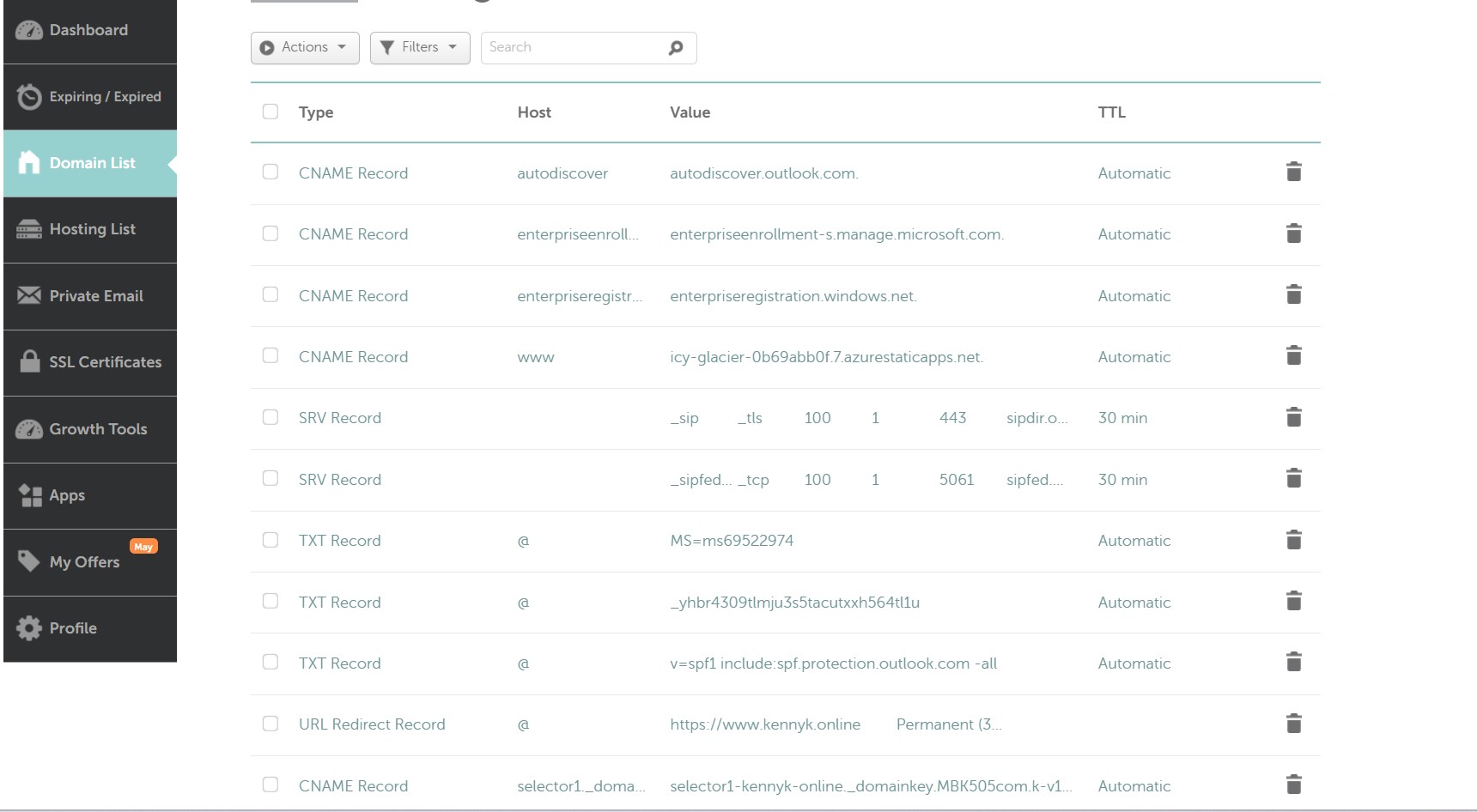
The Namecheap DNS management panel for kennyk.online showing the full set of Microsoft 365 authentication records: SPF TXT record (v=spf1 include:spf.protection.outlook.com -all), DKIM CNAME selector record (selector1._domainkey), Autodiscover CNAME, enterprise enrolment/registration CNAMEs for Intune MDM, and SRV records for Teams/Skype federation.
M365 Domain Status Healthy
๐Ÿ” Click to expand
M365 Admin ยท Domains ยท Health
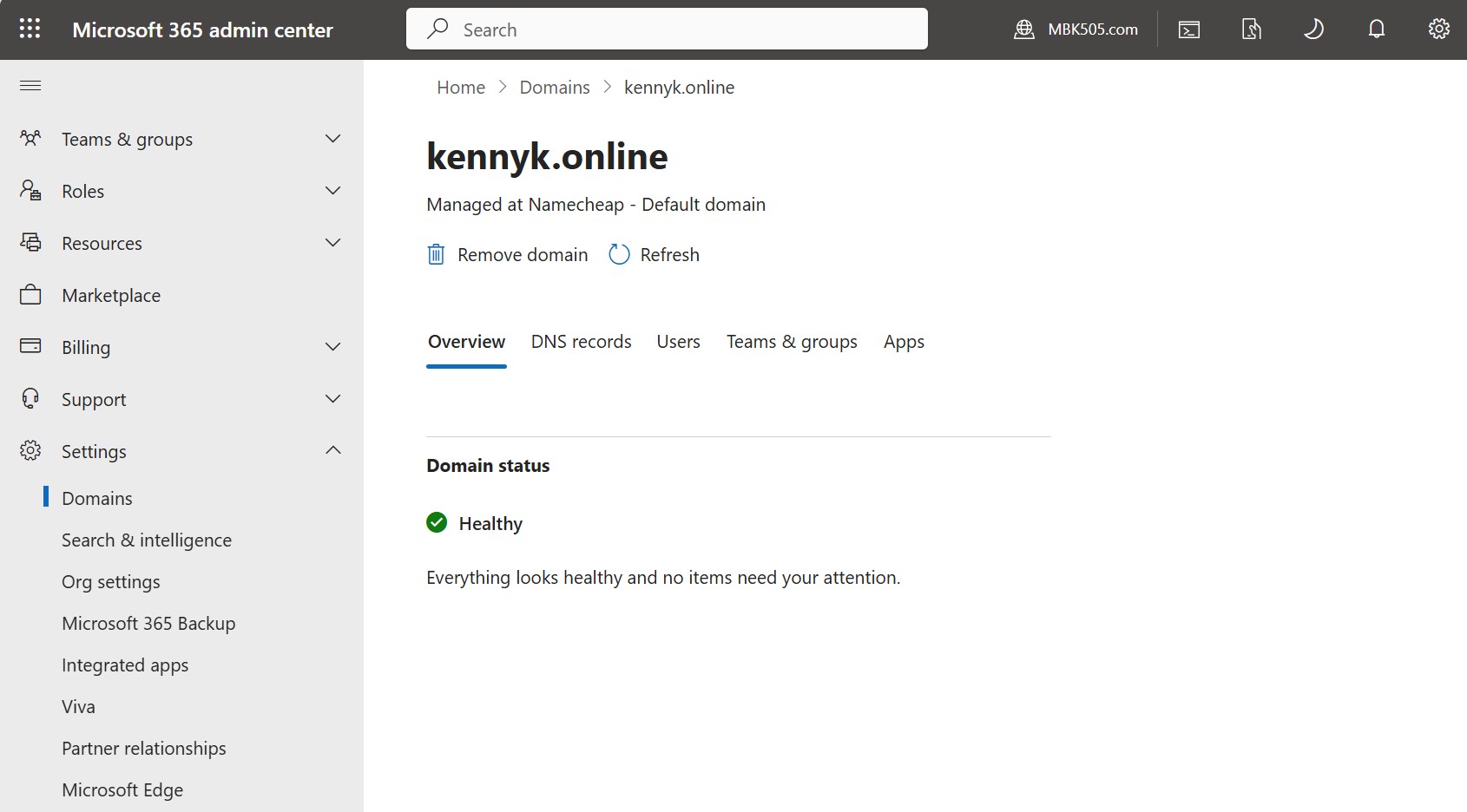
Domain Status โ€” Healthy โœ…
The Microsoft 365 Admin Center domain overview page for kennyk.online, displaying a Healthy status with the message "Everything looks healthy and no items need your attention." The domain is registered as the Default domain, managed at Namecheap, confirming all DNS records (MX, SPF, DKIM, CNAME) are correctly resolved and validated by Microsoft.
๐Ÿ›ก๏ธ

Microsoft Defender for Office 365 โ€” Threat Protection & Security Posture

Configured a comprehensive threat protection environment using Microsoft Defender for Office 365 on the kennyk.online tenant. This includes creating anti-phishing, anti-spam, and anti-malware policies, reviewing the full Threat Policies suite (Safe Attachments, Safe Links, Tenant Allow/Block lists), and achieving a Microsoft Secure Score of 84.64%. Threat Explorer was used to investigate real email delivery events by Network Message ID โ€” demonstrating active SOC-level investigation capability.
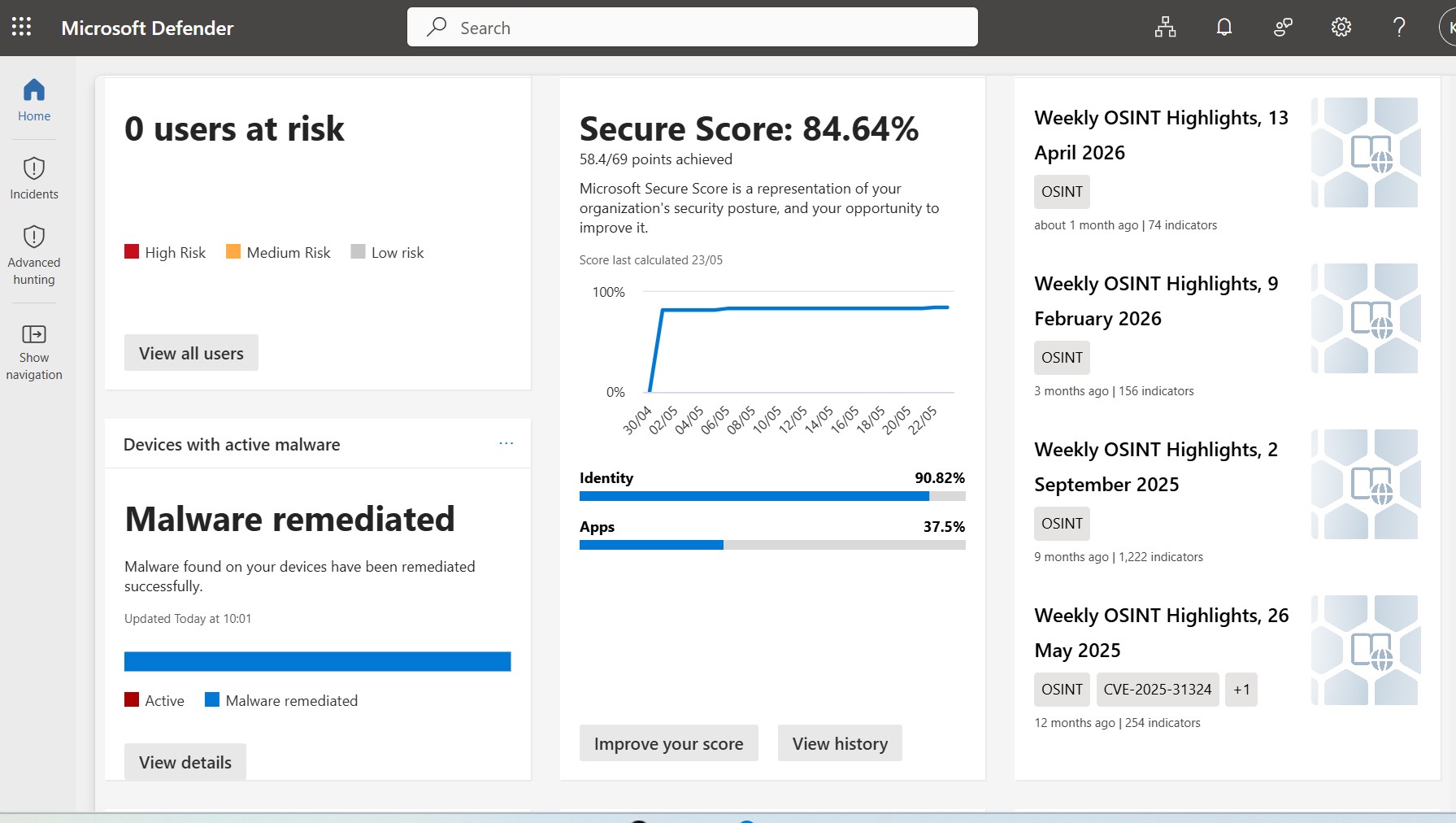
Microsoft Defender Secure Score
๐Ÿ” Click to expand
Defender ยท Security Posture ยท Secure Score
Microsoft Secure Score โ€” 84.64%
The Microsoft Defender home dashboard showing a Secure Score of 84.64% (58.4 / 69 points), with Identity scoring at 90.82% and Apps at 37.5%. The score graph shows a sharp improvement trajectory from near-zero to near-maximum, reflecting the systematic hardening of the tenant. Zero users are at risk, and all detected malware has been remediated.
Defender Threat Policies
๐Ÿ” Click to expand
Defender ยท Policies & Rules ยท Threat Policies
Threat Policies โ€” Full Policy Suite
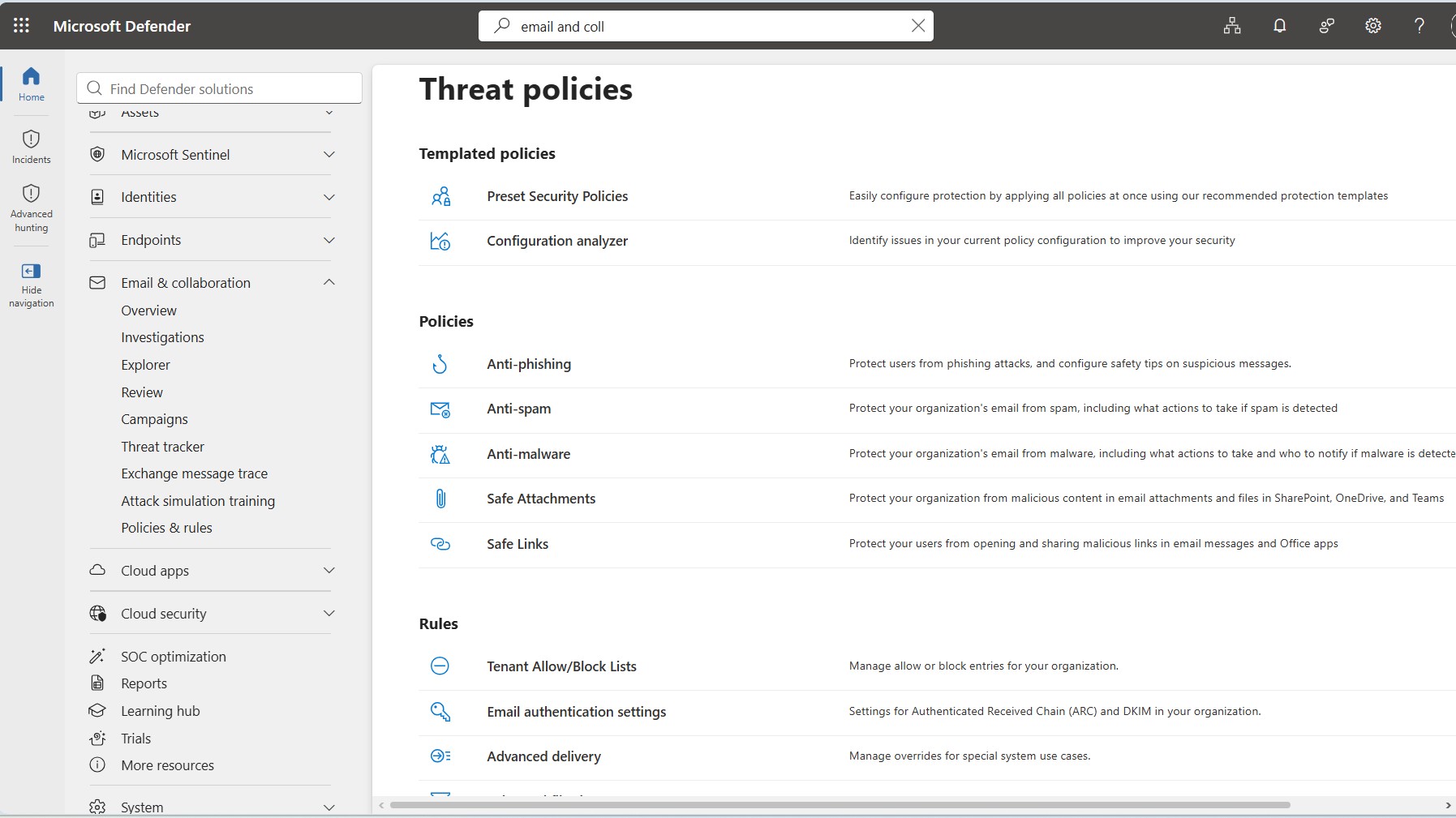
The Microsoft Defender Threat Policies overview page listing all available policy types: Preset Security Policies, Configuration Analyzer, Anti-phishing, Anti-spam, Anti-malware, Safe Attachments, Safe Links, Tenant Allow/Block Lists, Email Authentication Settings, and Advanced Delivery. This demonstrates a thorough understanding of the complete Defender for Office 365 policy framework.
Defender Anti-Spam Policies
๐Ÿ” Click to expand
Defender ยท Policies ยท Anti-Spam
Anti-Spam Policies โ€” Inbound, Outbound & Connection
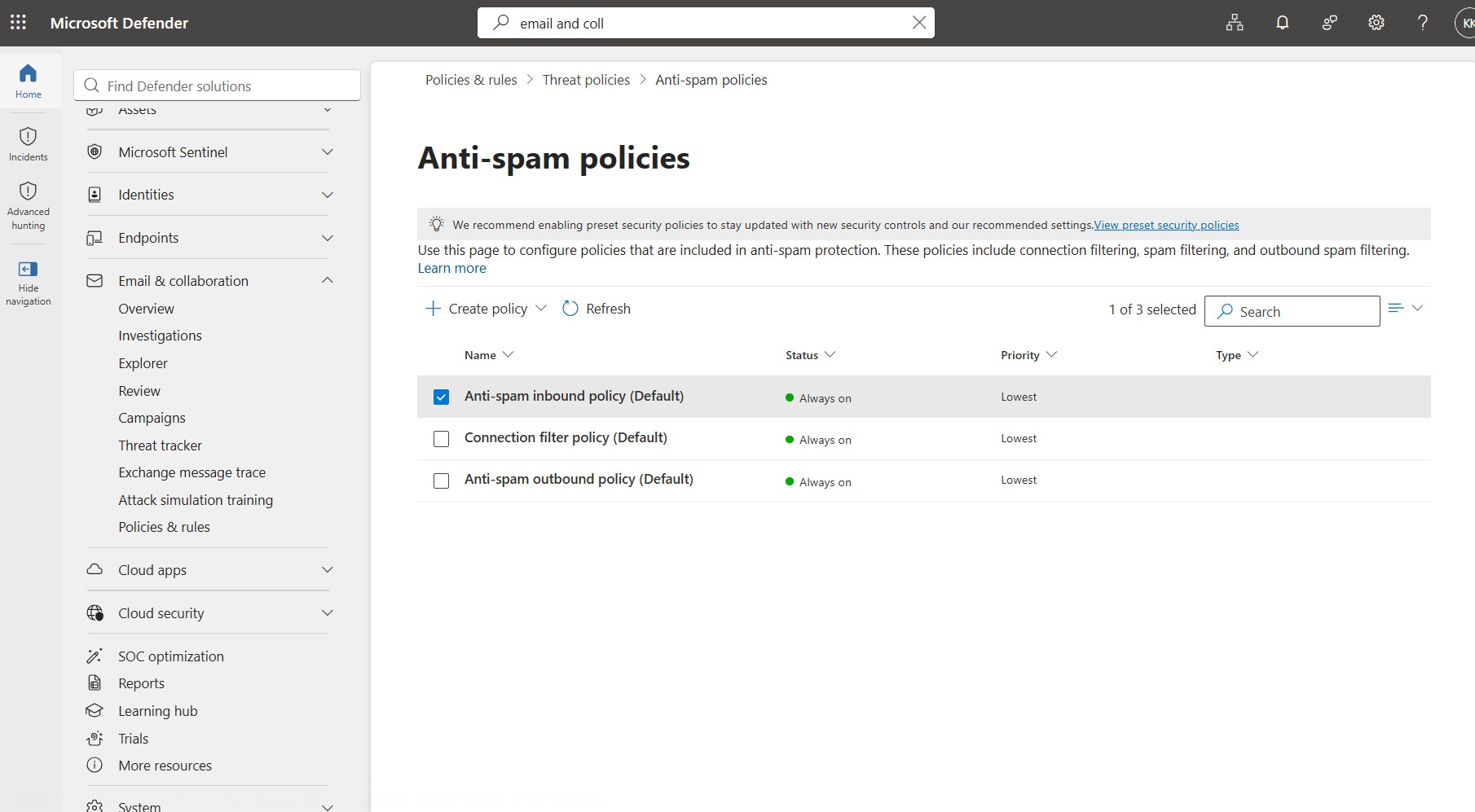
The Anti-spam policies page within Microsoft Defender showing three always-on policies: Anti-spam inbound policy (Default), Connection filter policy (Default), and Anti-spam outbound policy (Default) โ€” all set to Always on at Lowest priority. This covers full-spectrum spam filtering for inbound email, outbound email, and connection-level IP reputation filtering.
Defender Anti-Phishing Policy
๐Ÿ” Click to expand
Defender ยท Policies ยท Anti-Phishing
Anti-Phishing Policy โ€” kennyk.online
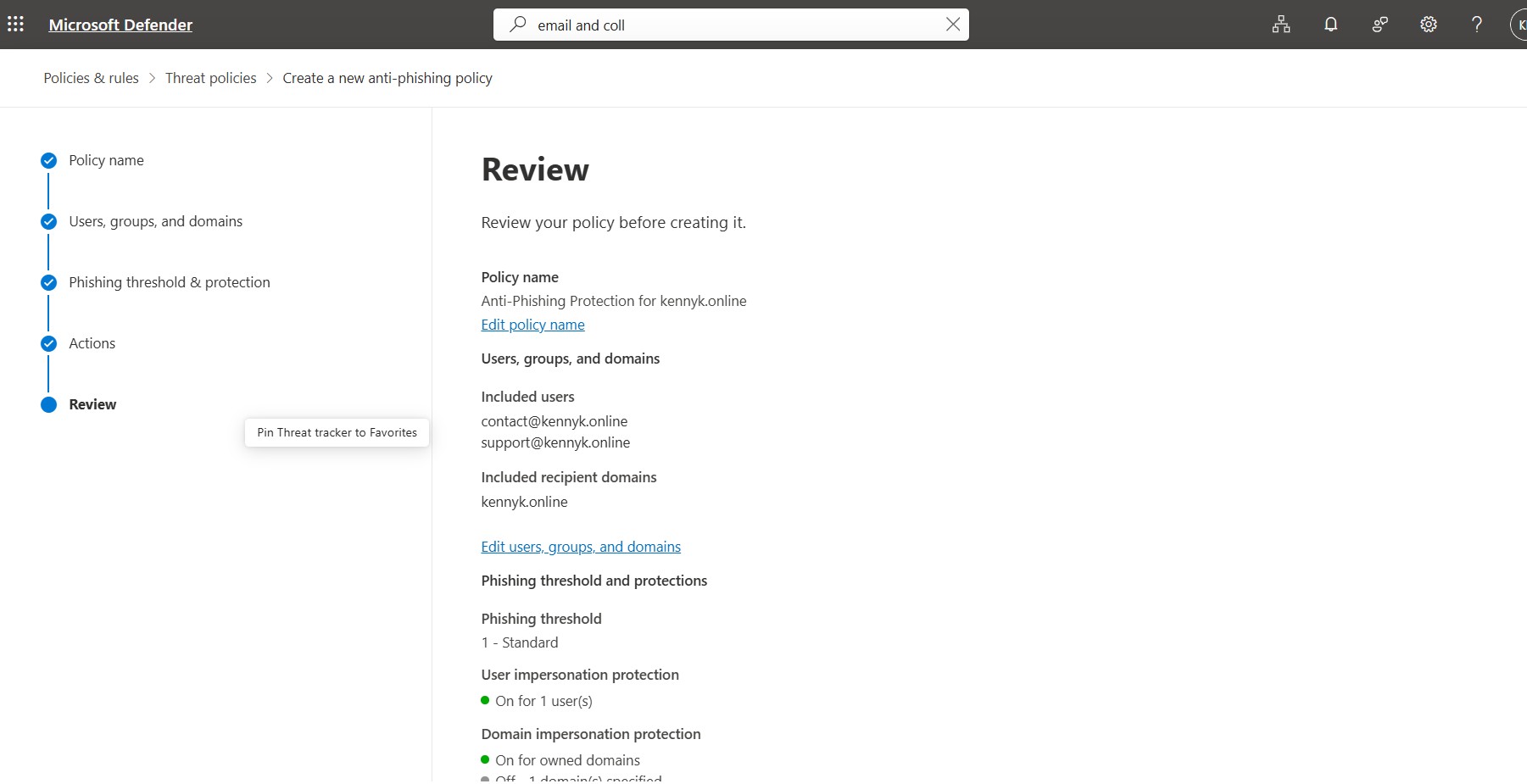
The review screen for a custom anti-phishing policy named Anti-Phishing Protection for kennyk.online, targeting users contact@kennyk.online and support@kennyk.online across the full domain. Phishing threshold is set to Standard (Level 1), with user impersonation protection enabled for 1 user and domain impersonation protection active for all owned domains โ€” providing multi-layer identity spoofing defence.
Defender Explorer Threat Hunt
๐Ÿ” Click to expand
Defender ยท Explorer ยท Threat Hunting
Threat Explorer โ€” Email Investigation by Message ID
Microsoft Defender's Threat Explorer being used to investigate a specific email by Network Message ID and recipient address (mbk505@gmail.com). The histogram chart shows a single delivered message on 23 May 2026, confirming the delivery action and allowing drill-down into email origin, URL clicks, top targeted users, and campaign attribution โ€” demonstrating active threat investigation workflow.
Say Hello

Get in Touch

Available for IT Support Analyst and Cloud Support roles in Melbourne. Let's connect.